
140 visits. Zero replies. That was the score on Nia’s care guide for hand-dyed yarn, posted in March: a wash-temperature chart, a fiber table and a joke about felting she still defends. Nia dyes wool in the spare bedroom above a laundromat, and the whole flat smells like a sheep fell into a pickle jar. (She’s invented. So is everyone else in this guide who owns a business or holds a red pen. The research is real.) The guide ran 900 words, every fact right. Ten days on, she snapped an indigo vat that had gone horribly sideways (pond scum, basically) and wrote one line under it: “I wanted teal, I got swamp.” By lunch, thirty-one strangers had weighed in. Two sent rescue recipes.
She dropped both numbers in front of Odette, an editor who carries a red pen the way other people carry house keys. “Same shop,” Nia said. “Same followers. What changed?”
“The first post was correct,” Odette said. “The second one gave people something to say.”
That’s the subject here: how to write engaging content people finish, answer and pass along, without letting accuracy slip. We’ll go reader first, then hooks, structure, media, social posts, brand voice, measurement, Google’s helpful content guidance and the strange new problem of getting quoted by AI search tools. Skim if you must. Odette would.
What Engaging Content Really Means
Nia wanted a definition. Mostly so she could argue with it.
“Engaging content,” Odette said, “is writing one specific reader finishes and then does something about.” Replies count. So do saves, forwards, signups and sales. Nothing happens afterward? Then it was wallpaper. Pleasant. Ignorable.
“So it’s not about being funny.”
“It’s about the reader doing something. Funny’s just one door.”
Which is why engagement content never means one thing. Nia’s newsletter lives on clicks to her shop. The swamp photo lived on replies. Her product pages live on whether anyone buys yarn. And content engagement, the heap of numbers all that throws off, can’t be judged by taste. Odette keeps a rule taped to her monitor: a post that earns laughs and gets forgotten is a good party, not good marketing. Aim to be just engaging and you’ve picked a weak target. A page can be hilarious and still sell exactly zero skeins.
Strange thing about search boxes: people chase this idea through odd spellings. Some type how to make it engaging. Some want to make it more engaging. A few type engaugeing, with a stray u wandering in. Odette shrugged at the typo. They all want the same thing, she said. Attention that actually does something.
How to Write Engaging Content Starts With the Reader
“Where do I even begin?” Nia asked.
“Whoever’s reading.” Odette made her open the returns inbox. Thirty messages. Same two questions, over and over. Is this the color in the photo? Will it felt if I wash it? The care guide answered neither in its first line. Nia had written for a reader who didn’t exist. Call her the Knitting Person: infinite patience, spotless sink.
Odette’s checklist had three questions. Who’s reading? What are they trying to get done? What do they already know? No persona poster, she added. (You’ve seen it: stock photo, big smile, somehow always called Karen.) Go read your inbox. It’s free and brutally honest. Sales calls are fair game. Support tickets count. So does whatever strange thing somebody typed into your search bar at 2 a.m. Odette’s math: five ten-minute chats with real customers beat a week alone with a blank doc and a cold coffee. She has run the experiment.
Match the search intent
Her next habit sounded almost rude. “Google your own keyword,” she said. “Then read page one like a customer, not a rival.” Nia scrolled past three step-by-step guides, a pile of templates, a comparison table or two and one very confident hot take. Whatever fills that page is the shape searchers expect, Odette said. You can beat it. Just hand over what they came for first.
Pick one user need per piece
“Eight,” Odette said. That’s how many things a reader might want, says the analytics firm smartocto, building on a BBC model. She counted them off with the red pen: updated, kept on trend, educated, given perspective, diverted, inspired, helped, connected. Not all eight in one article, obviously. Nobody does. Odette made Nia choose one for the care guide. Educate. Nia’s draft had been trying to educate, reassure and show off her dye work in one go, like a waiter carrying six plates. It dropped most of them.
Pick one need and relevant content shows up almost by accident, like a cat when you open a can. Picture the reader walking right past the piece. What do they lose? Be honest. And why should they read it today instead of next month? No answer? The topic isn’t ready. That’s the quiet center of creating good content: one reader, one job, one payoff.
The best content writing advice Odette ever gave fits on a napkin. It reads: “Write to my cousin, who still prints her boarding passes. Only words she’d say out loud.”
Build the Hook: Headlines and Openers That Keep Their Promise
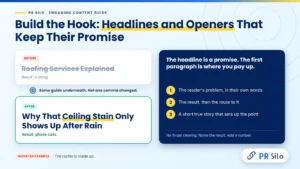
Tomás is an invented roofer with one leak guide and two headlines. “Roofing Services Explained” got a shrug. “Why That Ceiling Stain Only Shows Up After Rain” got phone calls. Same guide underneath. Not one comma changed.
“A headline is a promise,” Odette told him, tapping the desk. “The first paragraph is where you pay up.” Readers forgive plain. Misleading? Different matter entirely. Readers punish it. The platforms watching what people do after the click punish it harder. Specific wins nearly every time. “Onboarding made easy” says nothing. “Cut your onboarding emails from nine to four” paints one. Name the result. Add a number. Say who it’s for. A question works too, if the answer arrives fast.
Tomás wanted to know how to open. Odette held up three fingers like a referee with bad news. One: the reader’s problem, in their own words. Two: the result, then the route to it. Three: a short true story that sets up the point. Then she folded the hand away. No throat clearing either, she added, clearing hers. Nobody in history has kept reading because a post opened with how fast the digital world is moving. His homework was three headline versions and one colleague with one question: which would you click? Then test them once traffic allows. This is where how to write engaging content quits being theory and turns into a habit.
How to Write High Engagement News Articles
Pavel edits the site of a small-town paper (also invented). At 6 a.m. a water main bursts on Elm Street. His reporter files: “A water main break was reported Tuesday on Elm Street.” True. Dead on arrival. Pavel took a swing: “Elm Street is closed until Thursday and the 14 bus is rerouted.” One more line told people how to get to work. If you want how to write high engagement news articles on a sticky note, that’s the one. Lead with what changed. Then say why this particular reader should care, specifically. After that, context, with the weightiest bits up top. And the headline? It says what the story contains. No peekaboo.
Over lunch he read smartocto’s research and winced. Plain update stories, it notes, dominate newsrooms while earning some of the lowest engagement. His homepage? A museum of exactly those. A human angle, practical help or a bit of perspective gives the same facts a better shot. Then he opened the Reuters Institute’s 2023 survey and the sandwich stopped halfway to his mouth. About 2,000 people in each of four countries had been asked what would make them trust news more. Transparency won the most support of the strategies tested. So: show how the story came together. He could do that by Thursday.
One more rule went up above his desk, held by a single pin. Commuters get the short version. Long read for the evening. So before you fix a length for your own audience, ask when they read and in what format. That’s the unglamorous half of how to write high engagement news articles.
Structure Content for People Who Scan
In 1997, back in the era of dial-up screeches, the Nielsen Norman Group watched people read the web. Nearly four in five test users skimmed whatever page they landed on (79 percent, to be exact). Just 16 percent read it word by word. Old study. Same thumbs. Next time you’re in a grocery aisle, watch a stranger read a recipe on a phone. Thumb down. Thumb down. Stop at the number. Thumb down again.
Corinne writes manuals for a living (invented, obviously) and learned this the painful way. Her label-printer guide had one paragraph of eleven sentences. “Nobody finished that,” Odette said, circling it in red. “Split it.” So Corinne led every section with its key point. Headings like “Introduction” got fired. In came ones that said something, such as “Why the label jams at the worst possible moment.” Paragraphs shrank. Two sentences, three, four. Never eleven again. Parallel items became lists. A few key terms got bold, never whole sentences. Want the SEO side of structure? PR Silo’s on-page SEO services page covers how headings and keywords fit together.
Only ten minutes to make it more engaging? Odette goes for layout before wording. Longest paragraph: split. Longest sentence: sawn in half. Vaguest subheading: swapped for a specific one. Then she reads nothing but the headings, top to bottom, like a lazy reader would. If they can’t tell the story alone, they get rewritten. Down to five minutes? To make it engaging fast, rewrite the first hundred words.
Writing Content That Informs and Entertains
Corinne’s real problem was the other half. Her manual was correct and had all the sparkle of a damp sock. Draft two opened with the jam: a label sticking in the roller the exact moment you’re late for the post office. The table of settings came after. Now on her side, readers read the table. Every row.
That’s writing content that informs and entertains, Odette said, and she drew a seesaw on a napkin. “Inform too hard and you get an appliance manual,” she said. “Entertain too hard and readers have a lovely time and leave with no takeaway. You want somebody who walks away slightly smarter and slightly happier.” Corinne asked what informing even meant. “Every paragraph hands over something usable,” Odette said. “A step. A number. A decision rule. A named example. A mistake worth dodging.” And the entertaining half? “Rhythm. Pictures a reader can see. A point of view. The occasional ambush.”
Use concrete language
“Improve your results” is air. “Add one question to the end of each post and count the replies for two weeks” is a plan. Corinne pinned both to her wall, before and after. Specific words are easy to picture. Pictured ideas stick.
Tell short, true stories
No three acts needed. A person, a problem and a turn, in two or three sentences, makes an abstract point land. Corinne’s jam scene took four lines. Raid your own work for stories, and ask before you raid a customer’s. A fake testimonial does more damage than a dull paragraph ever could. Which explains the repeated reminders that this cast is made up.
Choose better words, not fancier ones
Corinne’s first draft was crowded with “solutions” and “innovative.” Odette crossed out every one. “If the customer was frustrated,” she wrote in the margin, “say frustrated. Not unhappy.” “One precise verb,” she said, “will make a sentence more engaging than six adjectives in a row.” Then came the punishment: Corinne had to read the whole draft out loud, slowly, in the voice of a bad audiobook. Mark where you run out of breath, Odette said. Readers run out there too.
Handle emotion carefully
What moves people sticks. Fake feeling, though? Readers smell it three paragraphs away. Odette’s line on emotion: sympathy has outsold hype since the invention of the shop. Admit the frustration. Point at the exit. Promise nothing the page can’t deliver.
A flat draft rarely needs fireworks. It usually needs to be more entertaining in small ways. Not a joke per line. Try a vivid comparison, a short sentence after a long one, an example nobody expected. Format can do some of the entertaining for you. A quiz. A calculator. A poll, a comparison table, a short illustrated explainer. Call them creative contents: they hand readers something to do instead of something to read. Best placed wherever the reader is stuck deciding.
Using Rich Media to Engage Your Site Visitors
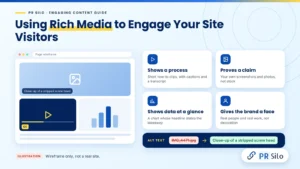
Hal runs an invented hardware store blog. His best post this year opened with a close-up of a stripped screw head, chewed up like a pencil eraser. “No stock photo could have said that,” he told Odette. She agreed. That’s using rich media to engage your site visitors at its simplest. The picture does a job the words can’t. It shows a process & proves a claim. It squeezes a pile of data into one glance, or puts a human face on the brand. Decoration doesn’t count.
Hal scribbled his rules on the back of a receipt and read them out like a sheriff. “Own screenshots, own photos. Stock never shows the real thing. Short videos for how-to stuff, with captions, because plenty of people watch on mute, and a transcript. Charts get a headline that states the takeaway, so nobody decodes a thing. Tables for long comparisons. Diagrams for sequences, because three paragraphs of fretting never explained anything.”
Then Hal switched on a screen reader to hear his own page. It read one image’s filename aloud, letter by letter: I, M, G, underscore, four, four, seven, one. Hal laughed so hard he had to pause it. “Alt text,” he said, wiping his eyes, “is supposed to describe the picture. Not recite a serial number.” The technical side belongs to the writer too, Odette added: compress the images, set their dimensions so the page doesn’t jump while loading, lazy-load anything below the first screen. Heavy embeds that slow a page defeat the purpose, and page experience is one of the things Google lists in its advice on succeeding in its AI search features. If load speed keeps biting, PR Silo’s technical SEO services cover it.
Odette’s test for pictures is cruel. Delete it, then squint. Did the page get worse? No? Then it was furniture. “And look at it on a phone before you hit publish,” she said, “because that’s where plenty of your readers will find it first.”
Produce Content Actionable & Relevant
The yoga studio on Nia’s corner (invented, like the rest) used to send a monthly email called “News from the studio.” Open rate: crickets. “Nobody wakes up wanting news from a studio,” Odette said. She helped the owner try “Tuesday’s 6 a.m. class moves to 7, and here’s how to claim your spot.” The room filled. “That’s actionable content,” she said. “The reader finishes it knowing what to do and how.” Her test is almost rude. She hands the last section to a stranger and watches. Can they act on it without opening another tab? Steps pass. Templates pass. A threshold, a worked example, a warning with a real number in it, all pass. “Stay motivated and keep pushing” goes in the bin, along with its cousin “think outside the box.”
“And if a section doesn’t help this reader today,” she added, “it’s relevant content for somebody else. Cut it. Give it its own post.”
The call to action got the same treatment. Hana’s page ended with a newsletter box, a poll, a shop link and a plea to follow her on three platforms. “One ask,” Odette said. “Nobody leaves a buffet remembering a single dish.” Out came everything but one line, “Which swatch would you pick?”, slotted in just after the paragraph that made people crave a swatch. Replies trickled in by Friday. “Tie the ask to what they just learned,” Odette said. “And if the next step is a phone call, the number goes beside the button. Three clicks away is a different country.” Fake deadlines got banned. “Offer ends soon” on an offer that never ends teaches readers to ignore every deadline you’ll ever set. On social, she said, a question nobody can answer with yes or no often pulls more replies than “like if you agree.”
Internal links count as calls to action too, the quiet kind. A reader finishes a section, spots the next guide waiting there, keeps walking. And if you’d rather hand the drafting to specialists, PR Silo’s content writing services cover blog posts, articles and web copy.
How to Use Blogs, Articles and Educational Content for Audience Engagement
The accounting firm (five people, invented, fond of biscuits) published “blog posts,” “articles” and “resources” and couldn’t have explained the difference if you’d offered the good biscuits. Their readers couldn’t either. “Know what people type when they’re stuck on this?” Odette asked the partners. “How to use blogs articles educational content for audience engagement. One breathless string, no commas.” The three formats blur, she said, so each one gets a job. The marker squeaked across the whiteboard. Blog posts: regular, timely, loose enough to sound like a person, and there to make visiting a habit. Articles: the heavy lifters.
Researched, evergreen, and quietly ranking and earning links while the partners nap. Third column: educational content. Guides, glossaries, templates, webinars with questionable lighting, courses: anything that teaches a skill. And a reader who has learned something, Odette said, is closer to deciding, whether she notices or not. “So it has to be actionable content,” she said. “A tidy explanation nobody can use is a lecture with good manners.”
Then she drew four more columns and labeled them with a marker that was clearly dying: educate, entertain, inspire, promote. Hootsuite calls them four content pillars. “Think of it as a brake,” Odette said, “for any calendar drifting toward ‘buy now’ every Friday.” Promotion stays the minority. Posts go into topic clusters so each one points at its neighbors. And the questions that sales and support hear on repeat? Those are educational content looking for a home. “Most content marketing writing tips stop right before this part,” she said, “and you can tell.”
Swap the accountants for a software firm or a corner shop and the question of how to use blogs articles educational content for audience engagement gets the same answer: one job per format, every piece judged by its own job. (The biscuits are optional.) More planning ideas live in the content marketing posts on the PR Silo blog.
How to Add Content to Posts You Already Have
Buried in the firm’s archive sat a 2020 post about reading a pay stub. Still pulling visitors. Also looking like a fridge from 1994. “Don’t burn it down,” Odette said. “Feed it.” Out went the 2019 statistic. Out went a screenshot of software that no longer has that button. A new section went in, answering the question from comment number fourteen, and the post got a fresh updated date at the top. Then Odette made them cut something of equal weight. “The post should gain value,” she said, “not just length.” A week later they re-shared it. Strangers who had never laid eyes on it turned up in a respectable trickle. Odette taped the recipe to the firm’s fridge, next to the biscuit tin. Mine the comments. Answer one real question.
Swap whatever’s stale. Trim to make room. “That’s how to add content to an old post,” she said, and took a biscuit. Knowing how to add content without padding turns out to be a skill all by itself, and the partners still argue over who’s best at it.
How to Create Engaging Social Media Content
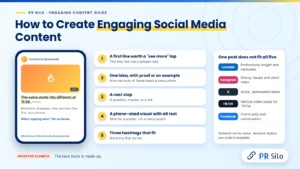
Rafa runs a taco truck (invented, 1,400 followers, one very loud generator). Monday he posted a menu photo captioned “Check out our new lunch menu!” Nine likes, mostly cousins. Thursday he filmed nine seconds of a blowtorch hitting a pineapple and typed “The salsa verde hits different at 11:58.” That clip traveled. “What did I do right?” Rafa asked, looking like a man who’d found a twenty in an old coat. Odette started counting on her fingers, the way you do when the milk bill looks wrong. “You opened with a flame & shot it for a phone, not a menu board. You wrote like a person. And you gave people a reason to reply, because everybody has an opinion about pineapple.” Four fingers, she said, is how to create engaging social media content. The craft of how to write engaging content doesn’t change on social. It just has less room.
“Which platform was that clip for?” she asked. Rafa blinked. “All of them?” “Then it was for none.” She reeled them off like a waiter reciting the specials, a little bored. LinkedIn wanted professional insight and carousels, plus a certain amount of throat-clearing. Instagram wanted strong visuals and short video. X wanted quick, opinionated takes, preferably spicy. TikTok wanted vertical video. Born there, not exported from another app with its old watermark still in the corner like a hall pass. Facebook wanted community and conversation, and possibly your aunt. Paste one post across all five and it limps. “Numbers?” Rafa asked. Odette waved her phone at him: Hootsuite’s guide to social post anatomy and network norms, caption lengths and hashtag counts laid out network by network. Tidy rows. Very satisfying rows. Then she tapped the screen. “They move,” she said. “Recheck before you build a template.”
Her skeleton for a post fit on a napkin. A first line that earns the “see more” tap. One idea, with a proof point or an example. A next step: a question, maybe, or a link. A visual with alt text. Hashtags and tags: three that fit. Not thirty that don’t.
Rafa’s budget was a taco truck and a loud generator, so for engaging content for social media he repurposed. The long post about his salsa recipe turned into a carousel, a short video, three standalone tips and a poll. “Cheapest trick in the book,” Odette said. “It’s also how to create engaging content on social media when you only have Tuesdays free.” A few manners came free with it. Credit anyone whose post you share, and ask first. Caption the videos. Emoji? Only if they earn the spot. (Preview them on a second phone. Grins have been known to turn into grimaces.) Answer comments early, because a live conversation extends a post’s life.
“How to create engaging content for social media also depends on timing,” Odette said. “Check when your own followers are online. Ignore the generic best-time charts.” Rafa’s lunch crowd scrolls around 11:30, so that’s when the clips go out. “And when somebody asks how to create engaging content on social media with no budget,” she said, “tell them the truth. Consistency, plus a point of view people can recognize.” More in the social media marketing posts on the PR Silo blog.
Creating captivating content for short video
Creating captivating content for short video, Odette told him, is a game of the first two seconds. Show the result or the trouble right away. One idea per clip. Burn in the text for the people watching on mute. End by asking for a comment or a follow. Rafa’s first cut dragged, and his instinct was to make it longer. “No,” Odette said. “Length was never the problem. It’s dull. Make it more entertaining, then make it shorter.” Captivating content on any platform plays the same trick: it tells the viewer, right now, why to stay. Fold the whole craft of how to create engaging content for social media into one clip and that’s what comes out.
How to Create Engaging Brand Content
Picture a nine-person software company where every blog draft goes through the CEO, a lawyer and one extremely opinionated product manager. (Invented. You’ve probably worked with them anyway.) By version six the post reads like nobody wrote it. Bea, the content lead, phoned Odette in despair. “A post is a conversation,” Odette told her. “Brand content is a personality. Same voice at the wedding, same voice at the funeral, different volume.” Nailing how to write engaging content for one page, she added, is the easy half. The hard half is sounding like yourself in a podcast, a pop-up ad and a thank-you card.
Odette’s fix fit on one page. Bea had one question, and it came out sideways: how to create engaging content for a brand without sounding like a brochure. “Start with voice,” Odette said. “Not the logo. Voice.” On a sticky note she wrote three adjectives. “Now a list,” she said. “Phrases you’d say. Phrases you’d sooner eat than say.” Then one paragraph rewritten from bland to on-brand, taped up where the whole team trips over it. “And give them something to remember you by. Original data.
A clear opinion. A brand that repeats what everybody else says leaves readers nothing to hold.” Then, quieter: “Humans. Real ones, on the actual page. Employees. Customers who said yes. Partners.” Bea wrote the list on her hand. “Show how decisions get made, and let the ones that went wrong count double.” Case studies and honest customer stories turn that proof into something people can read.
Odette called that the core of how to create engaging brand content. B2B, consumer, it doesn’t matter. Tone shifts. One reader and one job doesn’t. Bea sets out to create engaging content differently now. She covers the logo with her thumb and asks: could a stranger still tell whose this is?
A note on engagement agencies
A reader once asked Odette what is the industry of engagementmedia.nl. She checked. The site belongs to Engagement Media, a Dutch digital and content marketing agency, and right now its focus is AI in marketing: strategy, team skills, training and workshops, including a Content Marketing Academy. “So,” she said, “what is the industry of engagementmedia.nl? Marketing consulting and training, built around content.” Proof, if you needed it, that agencies sell engagement as a service. Engagement content is a field in its own right.
Engaging Content Examples You Can Borrow
“Principles slide right off people,” Odette said, tapping a sheet of paper. “Concrete engaging content examples stick.” That’s why the usual content marketing writing tips feel thin without them. Fair warning: the rewrites below are made up for this guide. They aren’t customer results. Steal the pattern, leave the wording.
| Format | Before | After | Why it works |
|---|---|---|---|
| Blog intro | “Welcome back to the blog! This week we’re talking about content.” | “Your last three posts earned traffic and zero replies. The posts people forward come down to five choices.” | Line one is the reader’s problem. Line two is the deal. |
| Email subject line | “June newsletter” | “The 3-minute fix for pages visitors abandon” | Benefit plus a price in minutes. Nobody has to guess. |
| Social post | “New guide is live!” | “Everyone skips step one: finding out why people open your posts at all. Five questions that fix that.” | Opens a gap and promises the way across it. |
| Product description | “Water bottle. Very good quality!!” | “Holds 750 ml, fits a standard cup holder, and survived a drop onto concrete. The concrete is fine too.” | Swaps adjectives for proof you could drop onto concrete. |
| News brief | “City council approves new budget.” | “Your bus fare goes up 20 cents in January. Here is where the money goes.” | Leads with what it costs the reader. Wallets read faster than councils. |
“Squint at the ‘after’ column,” Odette told Nia. Every line names a person, a problem or a payoff before the first comma. Every one trades a label for a detail. “None of these is just engaging for the sake of it,” she said. “Each one gives the reader a reason to keep going.”
Engaging content ideas to try this month
“Engaging content ideas don’t need to be original,” Odette said, uncapping a marker. “The angle needs to be yours.” Ten of them went onto the back of a laundromat flyer, in Odette’s handwriting, which resembles a seismograph:
- Myth versus fact. Nia’s version: “Seven things everyone believes about washing wool (four are wrong).”
- A teardown of one real page, arrows and circles included. Hal picked his own worst product page and showed it no mercy.
- A mini case study with one number and one lesson. Pavel’s: “We put the bus reroute in line one. Here’s what happened to the click rate.”
- A poll, then the follow-up. Rafa asked which taco deserved a permanent spot on the menu, and when the votes were in, he wrote a short obituary for each loser.
- A checklist people will screenshot and never admit to screenshotting.
- Behind the scenes, mess included. Corinne filmed her label printer jamming. On purpose, she swears.
- The question you’ve been asked most this month, finally answered properly.
- Your own analytics, laid bare. Hana’s version was called “Eleven experiments, three disasters.” The disasters got the comments.
- An interview with someone who disagrees with you. Hal grabbed the owner of the rival hardware store. They argued about washers for forty minutes, politely, and both shops shared the result.
- A quiz, or a skein calculator. Nia’s calculator says a sweater takes more yarn than you think, and it’s right. Creative contents like these get finished and passed along, mostly by people who want to compare scores with their sister.
Content Engagement Strategies You Can Measure
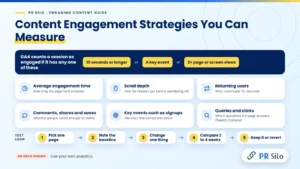
Hana (invented) opened her dashboard on Monday morning and found 312 views on her newest post. “Good?” she asked. Odette shook her head slowly. “Views are the least interesting number on that screen.” Content engagement strategies, she said, only get better once you can see what’s working, so she made Hana learn the vocabulary. “Define engaged,” Hana said. Odette read the engaged session definition off Google’s support page, flat as a train announcement. “In Google Analytics 4,” she said, “that’s ten seconds or longer, or a key event, or two or more page or screen views.” Engagement rate, she added, is just the sessions that counted. Bounce rate is everybody else. “Ten seconds?” Hana snorted. “That’s a sneeze.” “It’s a low bar,” Odette agreed. “For engagement content built around a deeper action such as a signup, look past it.”
| Metric | What it tells you | Where to look |
|---|---|---|
| Average engagement time | How long the page actually held a human | GA4 pages and screens report |
| Scroll depth | How far readers got before they wandered off | GA4 scroll event or your tag manager |
| Returning users | Whether anyone came back for seconds | GA4 |
| Comments, shares and saves | Whether people cared enough to bother | Social platforms and your comment section |
| Key events such as signups | Whether attention turned into action | GA4 key events |
| Queries and clicks | Which questions the page answers | Search Console |
Odette’s loop for Hana fit on an index card. One page with decent traffic. Write down its baseline. “One change per test,” Odette said. “Intro, headline or call to action. Pick one. Touch all three and you’ll never know which mattered.” Compare against similar pages for two to four weeks. What worked stays. What didn’t goes back where it came from. “And read the comments,” she added. “Comments, support tickets and session recordings explain what the numbers can’t.” Numbers say what happened. People say why, which is why the best content engagement strategies use both.
Follow Google Search Central Helpful Content Guidance
A tab in Odette’s browser has been open to the google search central helpful content guidance since roughly the Stone Age. (Other people keep a weather app open. She keeps this.) Odette does an impression of it, in the voice of a stern lighthouse. “People first. Rankings a distant second.” Then comes the quiz at the end, which asks about expertise, about authorship and about why the page exists at all, in a tone that suggests a tax audit. Odette printed the quiz and taped it beside Nia’s monitor, slightly crooked. By Friday Nia was muttering the questions at her own drafts like a mildly haunted person. Annoyingly, they’re also a big part of how to write engaging content that keeps earning traffic.
Then came the red pen. Odette went through Nia’s care guide and circled three things. No byline. No mention of how Nia had tested her wash temperatures (she’d run them on forty skeins, but the page never said so). And a closing paragraph that existed only to say “yarn” twice more. “Who wrote this?” Odette read off the sheet, tapping the first circle. “Why should anyone trust them?” Second circle: “How do you know?” Third circle: “Why does this page exist?”
Then she pushed the paper aside. “And where’s the part only you could write?” Nia thought about it. The forty skeins, she said. The ones that bled in hot water. “That,” Odette said, tapping the table, “is first-hand experience. That’s the page. Cut the padding around it.” One last test: does the reader leave with the question answered? Real input, clear sourcing, no filler. Odette calls it creating good content, Google-style, and says it fits on a bookmark.
Read it once and you’ve learned nothing, Odette says about the google search central helpful content guidance. She goes back to it like a checklist before every launch. The same thinking covers AI-assisted drafts. Google’s guidance on AI-generated content boils it down to one test: was the content created primarily for people, no matter which tool produced the first draft? Read the full people-first content guidance on Google’s site, and PR Silo’s SEO blog category has more on turning it into a workflow.
Write Content That AI Search Tools Can Cite
“Will ChatGPT quote my yarn guide?” Nia asked. Odette laughed. “Depends who else is talking about you.” She explained it over tea. Search now includes Google’s AI Overviews, ChatGPT search, Perplexity and more, and ranking well in Google doesn’t guarantee a citation in any of them. These tools retrieve pages, lift passages and assemble an answer. “So your content has to be easy to extract and easy to trust,” she said. They don’t behave identically, either. “AI search isn’t one target.” So how to write engaging content now includes writing it so a machine can lift a clean answer out of it.
Odette read Google’s own advice for its AI experiences aloud in the voice of a bedtime story, and the bedtime story was boring on purpose. “Unique, useful content for people,” she droned. “A good page experience. A page Google can actually access. Structured data that matches what’s visible on it.” She looked up. “That’s it. No special AI-only files. No secret markup. Good news if you’ve done everything above. A few extra habits help.”
Nia scribbled while Odette talked. “Answer first,” Odette said, “under every question-style heading.” Nia wrote that down. “Then two or three sentences of expansion. Claims specific enough to check, with the source named in the sentence itself.” Nia underlined that twice. “Credentials. A visible updated date. A calendar reminder to refresh whatever goes stale. Headings in a sensible hierarchy. Link text that says where the link goes, not ‘click here’ nine times.” She turned the sticky note over. “Then crawlers. Can the ones you want actually reach the page? Robots.txt rules. Bot settings at your CDN. Dull, and it matters. And get mentioned on credible third-party sites. AI tools lean on what other people say about you, not only on what you say about yourself.”
Which is where digital PR services and guest posting on relevant publications come in. A page that reads well still needs outside voices pointing at it, Odette said. Otherwise it’s a very well-dressed guest at an empty party.
Pre-Publish Checklist
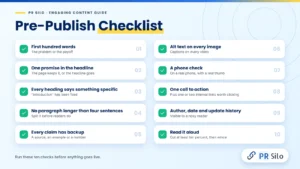
Inside the cover of Odette’s notebook, taped down at one corner, is a list of ten checks. It boils down how to write engaging content to something she runs before anything goes live:
- First hundred words: the problem or the payoff. Anyone clearing their throat gets shown the door.
- One promise in the headline. The page keeps it, or the headline goes.
- Every heading says something specific. “Introduction” has been fired.
- No paragraph longer than four sentences. (Corinne’s record was eleven. We don’t talk about it.)
- Every claim has a source, an example or a number standing behind it, arms folded.
- Alt text on every image. Captions on every video.
- A phone check, on an actual phone, with an actual thumb.
- One call to action, plus one or two internal links worth clicking. Not nine.
- Author, date and update history out where a nosy reader can find them.
- Read it aloud, to a wall if necessary. Cut at least ten percent. Wince. Then cut some more.
Nia swears that after enough runs, creating engaging content stops being homework. “It’s flossing,” she told Odette. “Boring. Non-negotiable. Weirdly satisfying.”
Frequently Asked Questions, Asked All at Once
By 5:40 on Friday the laundromat downstairs was rattling like a bag of loose teeth, and Nia had a list. Seven questions. Odette had no tea left and no excuse.
1. What is engaging content, according to Odette?
“Writing that makes somebody do something once the last line is behind them,” Odette said, not looking up from her empty mug. “Reply. Save. Sign up. Buy.” Nia pointed out that the care guide had been accurate. “Correct isn’t the same as engaging,” Odette said. “Nobody has ever replied to correct.” Nia mentioned that the swamp photo had pulled thirty-one strangers. “Exactly,” Odette said. “And two rescue recipes, one involving a bucket.”
Q2. My draft is flat. How do I make it more engaging?
Corinne asked this one, forehead on the table. “Cut first,” Odette said. “Then pick one reader and the one question she’s asking, and answer it before paragraph two.” Corinne lifted her head. “Cut what?” “Whatever you’d skip if you were the reader.” Odette thought for a moment. “End on one next step. Not four.” Corinne picked up the red pen and, for the first time all week, looked hopeful.
Q3. How do I know what my audience finds engaging (besides asking my mother)?
Pavel’s whiteboard answered this one, so Odette just pointed at it. Left column: what readers said in the comments. Right column: what they actually clicked. “Ask real readers,” she said, “not your mother. Then watch what they do.” The columns almost never agree. When they don’t, believe the right one. People are polite. Analytics are not.
Q4. Nobody replies. How do I encourage readers to interact with my content?
“One ask,” Odette said, and held up a finger. Hana’s “Which swatch would you pick?” pulled twenty-two replies, the first from her niece, who is six and answered in two seconds. Her earlier poll, with seven required fields, got zero votes. Put the question where interest peaks. Make answering stupidly easy. Then reply fast. (People who get ignored don’t ask twice.)
Q5. How do I create engaging content for social media in one free hour a week?
Rafa wanted this one tattooed somewhere. “Fit the platform,” Odette told him. “Open on the flame, not the logo. One idea per post, a visual made for that network, a reason to reply. Then stay in the comments.” He asked about the long salsa post. “Slice it,” she said. A carousel, a clip, three tips and a poll, all from one Tuesday afternoon.
Q6. How do I measure content engagement (without a statistics degree)?
Hana’s spreadsheet has seven columns, and Odette read them out like a very dull poem. Engagement rate. Average engagement time. Scroll depth. Returning users. Shares, comments, conversions. “Together,” she said. “Any single one lies a little.” Compare similar pages. Change one thing per test. Two, and you’re guessing. Hana had color-coded the columns and refused to explain why.
Q7. How long should my engaging content be? Asking for a friend.
“Exactly as long as the question needs,” Odette said, “plus zero extra sentences.” Lisbon’s time zone takes one line. An accounting package takes a guide with screenshots, and probably a sigh from whoever writes it. Long pieces hold readers when every section earns its seat. Padding doesn’t, though it’s very good at looking like thoroughness.
Final Thoughts
Nia printed the whole checklist, stuck it to the fridge under a magnet shaped like a sheep and went back to her vats. Odette already had her coat on, one arm in, when she gave the summing-up. “Learning how to write engaging content isn’t about tricks,” she said, hunting for the other sleeve. “It’s a run of small decisions. One reader. A promise in the headline, kept inside the first hundred words. A page built for people who scan. Something useful and something enjoyable on every screen.
Media that earns its place. A next step, then measurement.” She found the sleeve. “Hold it up against Google’s helpful content guidance, and write plainly enough that an AI tool could quote you without wincing. That’s writing content that informs and entertains, in forty seconds. The rest is practice.” At the door she turned around once more. “Creating engaging content is a skill you build one page at a time. The best content writing advice I know? Start with the page in front of you this week.”
Last week Nia posted another indigo photo. This one came out a smug, perfect teal. She captioned it “Told you” and went to put the kettle on. Her phone buzzed twice before the water boiled. By the time she poured, there were eleven replies and a stranger asking for the recipe. Search for it correctly or search for engaugeing, stray u and all, and the question underneath is identical: why should I keep reading? Answer it in the first line. Then answer it again in every section after.
If you’d rather have specialists do the heavy lifting, PR Silo’s content writing team builds search-ready articles, and the complete SEO solution connects that content to the rankings and links that bring readers to it.