
Strip a website down and it’s a folder. Pages, pictures, a bit of code. Hosting is the machine that keeps that folder reachable at 3 a.m. on a Sunday when nobody’s watching. Everything else, from a $3 shared plan to a rack in a data center, is a different answer to one question: whose computer is it, and who gets the alert when it dies?
This guide shows how to host a website on every budget, route by route. You’ll get the going rate in November 2026, the spot where each free tier quietly ends, and the exact steps to get live. Laravel, Django and React get their own sections because each one has a trap that bites nearly everybody once. There’s also a migration checklist that won’t torch your rankings, and a two-minute trick for finding out who hosts any site.
What Website Hosting Actually Does
Website hosting is server space that stays online and answers when asked. Type an address into a browser and it first asks the Domain Name System which IP address belongs to that name, then knocks on that machine’s door for the page. The domain is the street address. The host is the building. Different purchases, even if one company happily bills you for both.
One split decides more of your budget than any plan name. Static sites are plain HTML, CSS and JavaScript, with no database and no server-side code, so nearly any host will serve them and plenty do it free. That’s why how to host a dynamic website is a tougher question. WordPress, Laravel apps and online stores run code on every request and lean on a database, which means a real server environment. Most advice about website hosting only clicks once you know which kind you’re building.
Products come in five flavors. Shared plans pack many sites onto one server. A VPS slices one physical machine into isolated virtual ones. A dedicated server is the whole box, yours alone. Cloud hosting spreads a site over several linked machines. Builders like Wix sell the editor and the hosting as a single bundle. Every one of the web hosting services you’ll compare is a variation on those five.
Which Route Fits You
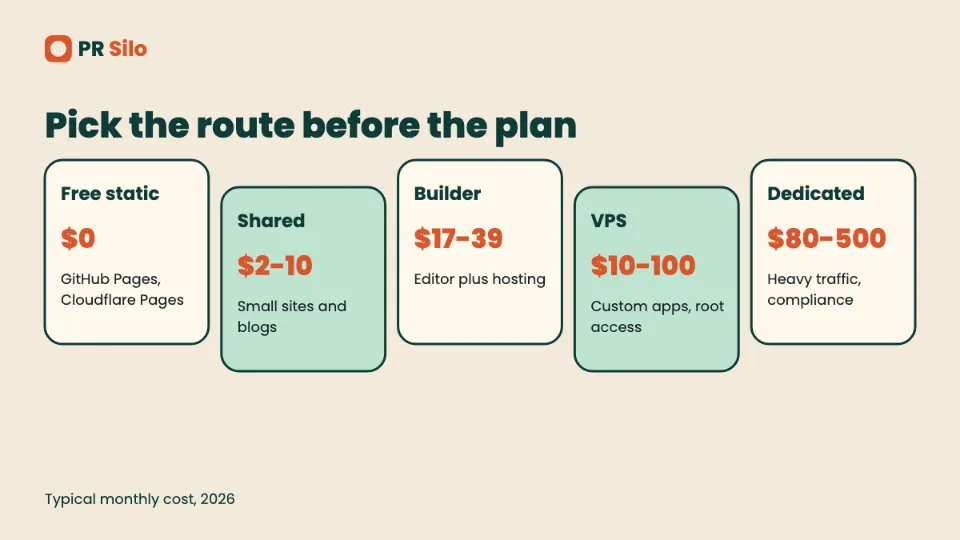
| Route | Typical monthly cost | Skill needed | Best fit |
|---|---|---|---|
| Free static host (GitHub Pages, Cloudflare Pages) | $0 | Low to medium | Portfolios, docs, landing pages |
| Shared hosting | $2 to $10 | Low | Small business sites, blogs |
| Website builder | $17 to $39 | Very low | Owners who never want to touch a server |
| VPS | $10 to $100 | Medium to high | Custom apps, growing sites |
| Dedicated server | $80 to $500 | High | Heavy traffic, strict compliance |
| Home server | Hardware plus power | High | Learning, private tools |
Skill counts as much as money when you’re figuring out how to host a website, so find the row that fits both. The cost column answers how much does it cost to host a website per month for each route. Steps for every one follow below.
How to Host a Website in Five Steps
Whichever provider you land on, how to host a website boils down to the same five moves. Order matters. DNS changes take time, and you want that clock ticking while you do everything else.
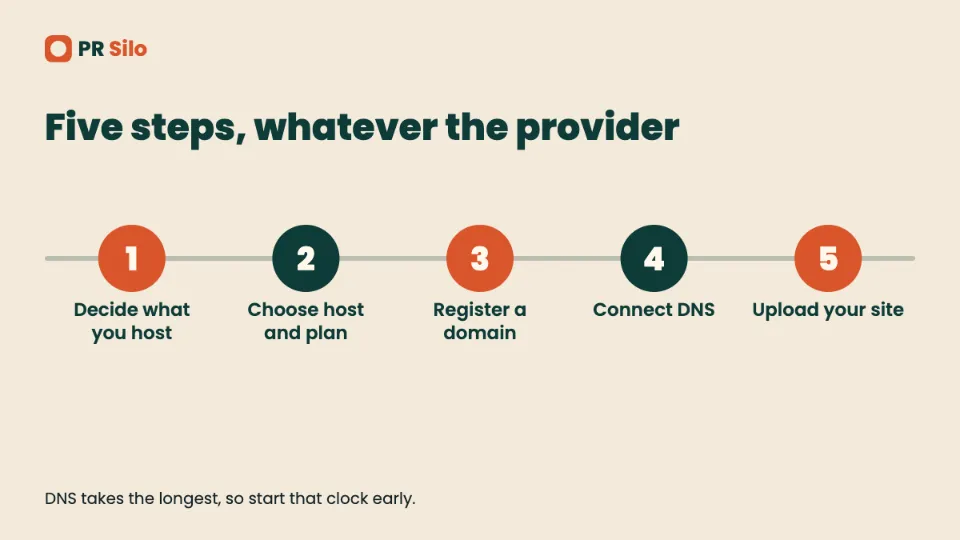
Step 1: Decide What You Are Hosting
Jot down three things: static or dynamic, what software runs it, and how many visitors you expect. If it’s static, how to host a static website is the easiest case going: upload the files, done. A six-page brochure site with 500 visits a day doesn’t need a $30 VPS. A store that could go viral overnight shouldn’t sit on the cheapest shared plan, because a crash mid-spike costs real orders.
Step 2: Choose a Host and a Plan
Match the plan to step 1, then compare storage, bandwidth, backups, support hours and, most of all, the renewal price. The section on how to choose a website host below digs into that. First site ever? If you’re treating this as how to host a website for beginners, a shared plan with one-click WordPress is the safest start.
Step 3: Register a Domain Name
Buy the domain from a registrar or straight from your host. Buying through the host saves setup time. Buying from a registrar keeps your exit open if you switch hosts later. Plenty of hosts throw in a free first-year domain, so check what it renews at before you say yes. For anyone working out how to host a website with domain name attached from day one, the order is host, then domain, then DNS.
Step 4: Connect the Domain to the Host
Two ways to do it. Swap the registrar’s nameservers for the ones your host hands you, which gives the host control of DNS. Or leave DNS where it is and edit records yourself: an A record pointing at the server’s IP, plus a CNAME for www. Propagation usually takes a few hours and sometimes happens almost instantly. Drop the TTL on your records beforehand and the wait shrinks, a trick worth even more during a migration. Once DNS settles, how to host a website with domain name attached is finished, because anyone typing your address now lands on your server.
Step 5: Upload or Install Your Site
On WordPress, most hosts offer a one-click install in the dashboard or cPanel. For hand-built files, connect over SFTP with FileZilla, WinSCP or Cyberduck, using the address, username, password and port your host gives you, then drag everything into the public web folder, usually public_html or htdocs.
A hand-coded page needs only an index.html in that folder. That’s how to host a html website on practically any shared plan, and the same file works on every free host further down. The identical upload covers how to host a php website, as long as the plan runs PHP and includes a MySQL database. Finish by loading the site over HTTPS on a phone and a laptop, submitting every form, and checking that www and non-www both resolve.
How Much Does It Cost to Host a Website?
The honest answer to how much does it cost to host a website runs from nothing to a few hundred dollars a month, and hosting type sets most of it. If all you want is a figure for how much to host a website for a typical small business, think $5 to $25 a month once renewal pricing kicks in.
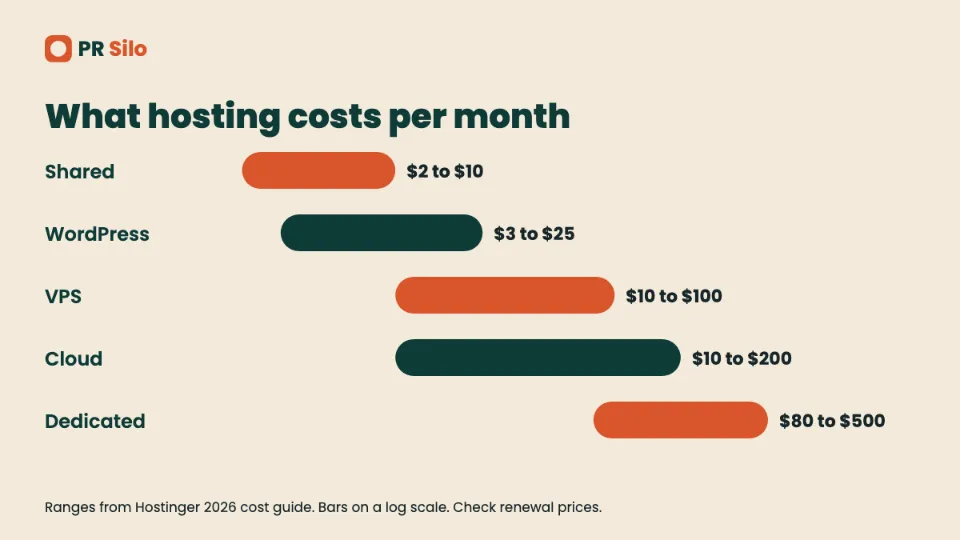
Hostinger’s 2026 cost guide puts shared hosting at $2 to $10 a month, WordPress hosting at $3 to $25, VPS at $10 to $100, cloud at $10 to $200 and dedicated servers at $80 to $500. Other surveys print higher VPS and dedicated ranges, so read those numbers as the middle of the market, not a ceiling. The full breakdown lives in Hostinger’s hosting cost guide.
Then there’s the banner price, which is where people get burned. It’s a promo rate welded to a long commitment, often 36 or 48 months. DreamHost lists its entry shared plan at $1.99 a month for 48 months, for instance, and the same plan renews at $7.99. Want a straight answer to how much does it cost to host a website per month? Use the renewal rate and ignore the banner.
Hosting isn’t the only line item either. A .com runs about $10 to $11 a year at an at-cost registrar like Cloudflare, closer to $14 at Namecheap’s renewal rate and around $22 at GoDaddy. SSL is free at most hosts and from Let’s Encrypt. Mailboxes on your own domain run from nothing to $15 a month each, and a premium WordPress theme is usually a one-off $30 to $100.
How Much Does GoDaddy Charge to Host a Website?
GoDaddy’s Economy shared plan is listed from $5.99 a month on a 36-month term and renews around $11.99. Deluxe starts at $7.99 and Ultimate at $12.99 on the same intro terms, and every plan includes a free domain and SSL for year one. So how much does godaddy charge to host a website once the promo dies? On Economy, about double the headline.
How Much Does Wix Cost to Host a Website?
Hosting comes baked into every Wix plan, so the real question is which plan. A free tier exists, but it comes with Wix ads, a wixsite.com address and roughly 500MB of storage. Paid plans on annual billing run $17 a month for Light, $29 for Core, $39 for Business and $159 for Business Elite. Light can’t take payments. For anyone asking how much does wix cost to host a website that actually sells things, the answer starts at the $29 Core plan.
How Much Does Squarespace Cost to Host a Website?
No permanent free plan here, just a 14-day trial. Entry plans sit between $16 and $19 a month on annual billing depending on which recent comparison you trust, and Squarespace raised prices in July 2026, so older articles quote stale numbers. Pay annually and you save up to about 30 percent over monthly billing. The short version of how much does squarespace cost to host a website: plan on about $19 a month for a basic site, more for commerce.
How Much Does It Cost to Host a WordPress Website?
The WordPress software costs nothing. The server it lives on does. Plans built for WordPress commonly run $3 to $25 a month, and fully managed hosts start higher, with DreamHost’s standard monthly rate at $24.99 for its entry plan. Layer on a premium theme and a couple of paid plugins at $5 to $30 a month and your working budget for how much does it cost to host a wordpress website lands in the low tens of dollars a month.
How Much Does It Cost to Host a Website on AWS?
For a static site, AWS’s own estimate is about $0.50 a month inside the free tier and $1 to $3 outside it, plus the domain. CloudFront’s always-free allowance covers 1 TB of transfer and 10 million requests a month, more than most small sites will ever touch. One catch: AWS moved new accounts to a credit-based free plan in July 2025, so the old promise of a full free year no longer holds for fresh sign-ups. Apps on EC2 bill by usage, which is why how much does it cost to host a website on aws has no single answer for dynamic projects. Set a budget alert before launching anything. AWS publishes a static website cost example with the line-by-line math.
How to Host a Website for Free
Free hosting is real. It’s also nearly always static, and every free plan has a ceiling. If you’re researching how to host a website for free, the useful question is which ceiling you can live with. Free website hosting suits portfolios, docs, landing pages and prototypes. How to host a static website without paying is the exact problem most of these platforms were built for, so here are the usual suspects.
How to Host a Website on GitHub
GitHub Pages serves a static site straight from a repository. Limits are published: 1 GB for the site, a soft cap of 100 GB of bandwidth a month and a soft limit of 10 builds an hour, which doesn’t apply if you publish through a custom GitHub Actions workflow. Free accounts need a public repo, so don’t park anything in there you wouldn’t tape to a lamppost. GitHub lists the current numbers on its Pages limits page.
Setup takes about five minutes, and MDN’s publishing guide walks through it:
- Sign up for GitHub and create a repository for the site.
- Upload your files in the web interface or push them with Git.
- Open the repo settings, choose Pages and pick the branch to publish.
- Wait a minute or two, then open the address GitHub shows, which follows the pattern username.github.io/repository-name.
- For your own domain, add a CNAME record at your DNS provider and enter the domain in the Pages settings.
That makes GitHub the gentlest answer to how to host a website for beginners with no budget. But if you’re learning how to host a website on github for a project that needs PHP or a database, stop here. Pages can’t run server-side code.
How to Host a Website on Cloudflare
Cloudflare Pages hooks into a Git repo, runs your build command and publishes the output to its global network. The free plan allows 500 builds a month, one at a time, 100 custom domains per project and 20,000 files per site, with unlimited bandwidth and static requests. Anything dynamic goes through Pages Functions on Workers, whose free tier tops out at 100,000 requests a day. Pro, at $20 a month billed annually, lifts builds to 5,000. Check Cloudflare’s Pages limits before planning around any number. When you’re deciding how to host a website on cloudflare, that unlimited bandwidth is what separates it from every other free tier here.
How to Host a Website on Vercel
Vercel’s Hobby plan is free but limited to personal, non-commercial projects, and it includes 100 GB of fast data transfer a month. A business site needs Pro at $20 per user per month, which comes with $20 of usage credit. The classic mistake is leaving a client’s site on Hobby because it was free when the prototype went up. If you’re figuring out how to host a website on vercel for paying work, budget for Pro from day one. Current numbers sit on Vercel’s pricing page.
Other Free Hosts Worth Knowing
Netlify’s free plan gives you 300 credits a month. A production deploy burns 15 and each gigabyte of bandwidth burns 10, so a busy project can drain the allowance faster than the old build-minute model suggested. Paid plans start at $9 a month. Neocities hands out free static hosting but keeps custom domains for paying accounts. Beyond the big names, free website hosting from smaller outfits tends to arrive with ads, tight caps or a short life span. Read the terms first.
How to Host a WordPress Website
WordPress comes in two flavors. WordPress.com is a hosted service with hosting included. WordPress.org is the free software you install on a host you pay for separately, and that’s the version covered here. Here’s how to host a wordpress website in six moves:
- Pick a plan built for WordPress, either shared hosting with one-click install or a managed host.
- Register or connect your domain and point the nameservers or A record at the host.
- Run the one-click installer from the dashboard or cPanel and set an admin password you don’t reuse anywhere else.
- Log in at yourdomain.com/wp-admin, set permalinks to post name, delete the sample content and install an SEO plugin such as Yoast or Rank Math.
- Turn on page caching, automatic backups and automatic security updates.
- Confirm HTTPS works and that search engines are allowed to index the site. The setting that discourages indexing is dead easy to leave on after staging.
If money is the sticking point, the pricing section above shows how much does it cost to host a wordpress website at different quality levels.
How to Self Host a Website
Self-hosting means you own or rent the machine and run the software yourself. Learning how to self host a website swaps money for responsibility: updates, security, backups and uptime all land on you. Forbes Advisor calls it technical, time-consuming and costly upfront, and often overkill for a small business. For a site that earns revenue, fair. For learning, tinkering and private tools, it’s hard to beat. The steps below cover how to host a website on your own server, whether that server lives in a cupboard or a data center.
How to Host a Website from Home
Two checks decide whether this will work at all. First, does your provider put you behind carrier-grade NAT? If your router’s WAN address falls in the 100.64.0.0 range, port forwarding is dead on arrival, because the provider owns the outer layer of address translation. Second, does your provider block inbound ports 80 and 443, or forbid servers in its terms? Both are common on residential lines.
If you pass both, the setup goes like this: give the server a fixed local IP, forward ports 80 and 443 on the router to it, and use dynamic DNS if your public IP changes. If you fail either, Cloudflare Tunnel is the usual workaround. The tunnel software opens an outbound-only connection to Cloudflare, so no inbound port needs to open and carrier-grade NAT stops mattering. It’s free, though Cloudflare’s terms restrict pushing big video or audio streams through it, so stick to web pages.
Be realistic about the ceiling. Residential upload speed, power cuts and provider terms make home setups shaky for a public site that has to stay up and rank. Anyone who still wants how to host a website from home as a learning project should add a UPS, automatic off-site backups and a firewall before the first visitor shows up.
How to Host a Website on Your Computer
A laptop can serve a site in under a minute. Open a terminal in your site folder, run python -m http.server 8000, and visit localhost:8000. That’s the quickest answer to how to host a website on your computer, but it only works for you. To let other devices on your network see it, use your machine’s local IP and allow the port through the firewall. To show it to the world, you’re back at the home hosting problems above. The same command handles how to host a html website on your own machine. Beyond testing, treat local hosting as a development step and publish from a real server.
How to Host a Website on XAMPP
XAMPP bundles Apache, MySQL and PHP into a single installer for Windows, macOS and Linux, which makes it the easiest way to run a PHP or WordPress project on your own machine. It also covers how to host a php website for testing before anything goes public. The process for how to host a website on xampp is short:
- Install XAMPP and open its control panel.
- Start Apache, and start MySQL if the site uses a database.
- Copy your site folder into the htdocs directory inside the XAMPP folder.
- Visit localhost/your-folder-name in a browser.
- For WordPress, create a database in phpMyAdmin first and enter its details when the installer asks.
XAMPP is built for development, not production. It handles how to host a website locally with a full PHP stack, and the finished site then moves to a real server. Anyone searching for how to host a website locally on Windows will end up with this setup.
How to Host a Website on a Raspberry Pi
A Raspberry Pi is a cheap, low-power machine that handles a small static site or a light blog without complaint. The process for how to host a website on a raspberry pi mirrors the VPS steps further down. Install Raspberry Pi OS, set a fixed local IP, install Nginx, copy your files into /var/www/html and expose the server with port forwarding or a tunnel. Boot from an SSD instead of an SD card if the site writes data often, since cards wear out. A Pi makes a great teacher and a poor choice for anything that mustn’t go down.
How to Host a Website on a VPS or Dedicated Server
How to Host a Website on VPS
A VPS gives you root access to an isolated virtual machine for roughly $10 to $100 a month, which makes it the middle ground for how to host a website on your own server without buying hardware. If you want to learn how to host a website on vps without a control panel, this is the standard recipe on Ubuntu LTS:
- Create the server and add an SSH key. Generate one locally with
ssh-keygen -t ed25519, upload the public key during signup and turn off password logins. - Update the system, create a non-root user and enable a firewall that allows only SSH, HTTP and HTTPS.
- Install Nginx or Apache, plus whatever runtime the site needs.
- Upload the files to a folder such as /var/www/yourdomain.com with rsync or SFTP and point a server block at it.
- Create A records for the domain and www pointing at the server’s IP address.
- Install Certbot and request a free Let’s Encrypt certificate. It lasts 90 days and Certbot renews it about 30 days before expiry, so run one dry-run renewal to confirm the timer works.
Want the background on what you’re actually renting? Our guide to what VPS hosting is explains the architecture and the trade-offs against shared plans.
How to Host a Website on a Dedicated Server
The setup follows the VPS recipe, except you choose more of the stack. You pick the hardware, the operating system (Ubuntu, AlmaLinux and Debian are common Linux picks) and often a control panel like cPanel with WHM, Plesk, DirectAdmin or Webmin, most of which carry yearly licensing fees. Dedicated servers run about $80 to $500 a month on the common bands, and DreamHost’s dedicated line starts at $165.
A dedicated machine earns its price when a VPS runs out of headroom, or when compliance rules such as PCI DSS or HIPAA demand isolation. Decide early between managed and unmanaged. Managed means the host patches the operating system and watches the hardware. Unmanaged means a 3 a.m. disk alert is yours to fix. Either way, set up monitoring with something like Prometheus and Grafana, automated alerts and off-site backups, because those are the gaps that turn a hardware fault into a lost site. That’s the whole discipline of how to host a website on a dedicated server: the VPS steps, with every safety net now your job.
How to Host a Website on AWS
Amazon Web Services can do almost anything, so the first fork is static or dynamic. The static path is the cheap, low-maintenance one for how to host a website on aws:
- Create an S3 bucket and upload your built site files. Keep the bucket private.
- Create a CloudFront distribution with the bucket as its origin and Origin Access Control switched on, so only CloudFront can read the files.
- Request a free certificate in AWS Certificate Manager, in the us-east-1 region, which is where CloudFront expects it.
- Add your domain as an alternate domain name on the distribution and attach the certificate.
- Point your DNS record at the CloudFront domain, through Route 53 or any other DNS provider.
One gap trips up a lot of tutorials. Behind CloudFront with a private bucket, a URL like /about/ won’t automatically load /about/index.html, so visitors hit an access error. A small CloudFront Function that rewrites those requests fixes it, and invocations cost $0.10 per million.
For dynamic sites, launch an EC2 instance, open only ports 80 and 443 to the world and port 22 to your own IP, attach an Elastic IP so the address survives a reboot, then follow the VPS steps above.
AWS Variations: EC2, S3, ALB and PHP
Searches on this one come in a dozen flavors. How to host a website on amazon aws, how to host a website on amazon web services and how to use amazon web services to host a website all mean the same thing: pick S3 for static files or EC2 for a server. People also type how to host a website aws, how to host a website in aws and how to host a website on amazon, and the answer doesn’t change.
For files only, how to host a static website on aws means S3 plus CloudFront, covered above. How to host a static website in s3 is the shorter version of that recipe, and how to host a static website on aws s3 is the same one again. Need a real server? How to host a website on ec2 starts with launching an instance. How to host a website in ec2 instance, how to host a website on an ec2 instance and how to host a website on aws ec2 are one job: launch, install Nginx, point DNS. How to host a static website on aws ec2 works too, though it’s overkill for plain files.
Free is trickier. How to host a website on aws for free and how to host a website for free on aws both lean on the credit-based plan for new accounts, so treat free as a trial, not a permanent state. How to host a dynamic website on aws means EC2, Elastic Beanstalk or containers, and how to host a php website in my aws machine means a Linux instance running Nginx or Apache, PHP-FPM and MySQL. How to host a react website on aws is S3 and CloudFront with a fallback rule.
How to host a secure website using alb: put an Application Load Balancer in front of your instances, attach a certificate from Certificate Manager to the HTTPS listener, redirect port 80 to 443 and keep the instances in a private security group that only accepts traffic from the balancer.
And the one with the best title: how to host a website on s3 without getting lost in the sea. Keep the bucket private, serve it through CloudFront, enable Origin Access Control, then write down the distribution ID. Four things. That’s the whole map.
Cost questions follow the same pattern. How much does aws cost to host a website, and how much to host a website on aws, depend on the route. A static site sits near a dollar or two. A server bills hourly, plus storage and traffic.
How to Host a Website on Azure, Google Cloud and Firebase
How to Host a Website on Azure
How to host a website on azure has an easy free answer for static files. Azure Static Web Apps has a free plan with 100 GB of bandwidth a month, 500 MB of total storage, 250 MB per app and two custom domains, according to Microsoft’s quota page. SSL is free. The plan is meant for hobby projects and has no SLA.
How to host a static website on azure: connect a GitHub repo, pick the build preset and let the workflow deploy. How to host a dynamic website on azure takes a bit more. Add an API through Azure Functions, or move the whole app to App Service or Container Apps. How to host a website in azure and how to host a website in azure for a client use the same two options.
How to Host a Website on Google Cloud
How to host a website on google can mean four different products, so pick by site type. How to host a static website on google cloud means a Cloud Storage bucket. How to host a website through google cloud for something dynamic means Cloud Run or Compute Engine.
Cost first. How much does google charge to host a website? Storage runs about $0.02 a GB a month, and Always Free covers 5 GB of regional storage in US regions, per Google’s own Cloud Storage page. Traffic leaving the bucket is billed separately, around $0.12 a GB after the free allowance, so egress is where small sites get surprised. How much to host a website on google is therefore a few cents for a small static site and more once visitors show up.
How to host a website on google cloud for free is possible, but it needs a billing account on file even inside the free tier. A bucket hosts files and nothing else. Anyone asking how to host a website for free on google usually wants Firebase, covered next.
How to Host a Website Using Firebase
How to host a website using firebase is the friendliest Google route. The no-cost Spark plan includes 10 GB of Hosting storage and 360 MB of transfer a day, plus a custom domain and SSL, according to Firebase’s pricing page. Install the CLI, run firebase init hosting, then firebase deploy. No card needed on Spark. When a product runs out of quota it stops responding until the reset, so a viral day can take a site offline.
How to Host a Website on Google Drive
How to host a website on google drive for free and how to host a website for free on google drive were once easy questions. Google retired website hosting from Drive in 2016, so any tutorial that still shows it is out of date. Use Firebase Hosting, GitHub Pages or Cloudflare Pages for the same job.
How to Host a Dynamic Website: Laravel, Django, React and Node.js
Dynamic sites need a runtime, a process that stays alive and usually a database. These four stacks account for most of the questions, and each has one trap that catches first-timers.
How to Host a Laravel Website
How to host a laravel website mostly comes down to one rule: the web server’s document root has to be the project’s public directory, never the project root. Point Nginx at the root and your .env file, config and logs are sitting on the open internet.
On an Ubuntu VPS with Nginx, PHP-FPM and MySQL, clone the project into /var/www and run composer install --no-dev. Copy the environment file, set production values with debug off and generate an application key. Run php artisan migrate --force, then cache the config, routes and views. Make sure the storage and bootstrap/cache folders are writable by the web user. Add a queue worker under Supervisor or systemd if the app uses queues, and a cron entry if it uses the scheduler. A 502 Bad Gateway nearly always means Nginx is aimed at the wrong PHP-FPM socket or the service is down. On shared hosting, set the domain’s document root to the public folder in the control panel.
How to Host a Django Website
Django needs a production application server, and Gunicorn behind Nginx is the default pairing. How to host a django website safely hangs on four settings. Set DEBUG to False. Fill in ALLOWED_HOSTS with your domain names, because with debug off an empty list makes Django answer every request with 400 Bad Request. Load SECRET_KEY from an environment variable. Set CSRF_TRUSTED_ORIGINS to your https addresses.
Then set STATIC_ROOT and run python manage.py collectstatic, apply migrations, run Gunicorn as a systemd service and let Nginx serve static files directly. Add a certificate with Certbot. Managed platforms can shortcut much of this, but they still expect the same settings.
How to Host a React Website
Once you build it, a React app is a static site. Run the build command, take the output folder (usually build or dist) and upload it to any static host: GitHub Pages, Cloudflare Pages, Netlify or an S3 bucket. For how to host a react website without broken links, add a fallback rule so deep URLs like /pricing return index.html instead of a 404, because routing happens in the browser. Environment variables get baked in at build time, so rebuild after changing them. A server-rendered framework such as Next.js is different and needs a Node host or a platform like Vercel.
How to Host a Node JS Website
Node needs a long-running process. The classic VPS setup for how to host a node js website is a process manager such as PM2 to keep the app alive and restart it after crashes, with Nginx as a reverse proxy sending traffic from ports 80 and 443 to the local port the app listens on, usually 3000. Add HTTPS with Certbot and keep secrets in environment variables, not in the repository.
Managed Node hosting skips the server work. SiteGround’s Node.js plans, for instance, list GrowBig at $3.99 a month for five Node.js projects on a 12-month prepay, renewing at $29.99. A clean example of why renewal prices matter.
How to Host a Website on GoDaddy, cPanel and Other Shared Hosts
Shared hosts have a lot of searchers. How to host a website on godaddy, how to host a website godaddy and how to host a website in godaddy all lead to the same dashboard. For how to host a website in godaddy step by step: buy a hosting plan, open the product page, choose cPanel Admin, then upload files to public_html or install WordPress with the one-click tool. Point the domain, wait for DNS, check HTTPS. If you only want the price, how much to host a website on godaddy was covered above, starting at $5.99 a month on a 36-month term.
How to host a website in cpanel is the same in spirit on any host. Open File Manager or connect over SFTP, drop the files into public_html, create a database in MySQL Databases if the site needs one, and visit the domain. BigRock works the same way, so how to host a website in bigrock follows the cPanel steps. People also search how to update a website, on blue host. Log in, open cPanel from the Advanced section, edit or upload the changed files in public_html, and clear any caching plugin afterwards.
Free Providers: InfinityFree and 000webhost
How to host a website in infinityfree is a signup, a subdomain and an upload. The free plan lists 5 GB of disk space, 400 MySQL databases and no ads, but a hit cap of 50,000 a day, and free hosting no longer includes email, according to InfinityFree’s own forum. Cross the hit cap and the account can be suspended. Anyone asking how to host a website for free on 000webhost should check that the service still accepts new signups before building on it, since free tiers come and go. The same goes for how to host a website online free in general: pick a host that publishes its limits.
How to host a website at home for free and how to host a website at home for free with a laptop are covered in the home section. How to host a website for free with domain name and how to host a website for free with custom domain are easier than they sound. Cloudflare Pages, Netlify and Firebase all attach a custom domain on free plans. You still pay the registrar for the name itself.
Netlify and Hostinger
How to host a website for free on netlify: connect a repository, set the build command and publish directory, deploy, then add your domain. How to host a react website on netlify is the same flow, plus a redirects file so deep links return index.html. How to host a react website on hostinger is a different route, since a Node.js build on a Business Web Hosting plan or a Cloud plan is needed for server-rendered apps, but a plain React build can go into public_html like any static site.
Older Stacks: AppHarbor, CentOS 7 and .NET
How to host a website on appharbor is a legacy question. AppHarbor was a .NET platform, so new projects usually go to Azure or a VPS now. How to host .net website: modern ASP.NET Core runs behind Nginx on Linux or on Windows with IIS, and Azure App Service handles both. How to host a website in centos 7 is a trap. CentOS 7 reached end of life in June 2024, so install AlmaLinux or Rocky Linux and use the VPS steps above.
How to Host Different Kinds of Websites
The right host depends on what the site is. Here are the most common builds, short and direct.
Static, Simple and HTML Sites
How to host a static website is the cheapest problem in hosting, and where to host a static website is mostly a choice between GitHub Pages, Cloudflare Pages, Netlify and Firebase. How to host a static website vs dynamic website comes down to code on the server. Static serves files as they are. Dynamic builds each page per request.
Free versions get searched constantly: how to host a static website for free, how to host a static html website for free, how to host a html website for free, how to host my html website for free and how to host a simple html website for free all end at the same shortlist. The year-tagged ones, how to host a simple html website for free 2026 and how to host a static html website for free 2026, get the same answer with newer limits. For how to host a simple website, how to host a simple website for free, how to host a basic website and how to host a website html: write index.html, upload, check the HTTPS padlock. How to host my website for free and how to host my website follow the same path, whether you picked a host yet or not.
Where to host a website for free is the question under all of these. A static site goes on a free static host. A PHP or WordPress site needs a free shared host with real limits.
Personal, Portfolio, Blog and Business Sites
How to host a personal website is a smaller job than people expect. How to host a personal website for free and how to host a personal website on github both land on GitHub Pages, and how to host a portfolio website, how to host a portfolio website for free and how to host a portfolio website on github do too. A portfolio is a handful of static pages and images, so free is realistic. How to host a blog website is different. A WordPress blog needs PHP and a database, so use shared or managed WordPress hosting.
How to host a business website, or how to host a website for my business, should skip free tiers. Pick a plan with backups, support and a clear renewal price. How to host a custom website and how to host a coded website sit in the middle. A custom front end is static. A custom back end needs a server. How to host a javascript website is the static case unless Node is involved, and how to host a dynamic website for free is rarely worth the trouble. How to host a dynamic website on github is not possible, because Pages serves files only.
Framework Sites: React, Next.js, Vue, TypeScript and More
How to host a react js website, how to host a react website for free, how to host a react website on github and how to host a react website on aws all end in the same static build, as covered earlier. How to host a next js website and how to host a nextjs website are a different animal. Next.js apps with server rendering need Node, so a platform like Vercel is simplest. How much does it cost to host a website on vercel? Hobby is free for personal use, and Pro is $20 per user a month.
How to host a vue website: build it, upload the dist folder to any static host, add a fallback to index.html for routing. How to host a typescript website is the same, because TypeScript compiles to JavaScript before it ships. How to host a node js website for free works on Render-style free tiers or a free VPS credit, while how to host a node js website using pm2 and nginx is the VPS recipe above. How to host a web3 website usually means a static front end on a normal host or IPFS, with wallet logic running in the browser.
Website Builders and AI Site Tools
How to host a canva website: publish from inside Canva, which gives you a canva.site address, and connect a custom domain if your plan allows it. How to host a muse website: Adobe Muse was discontinued in 2018, so export the site as HTML and upload it like any other static site.
How to host a lovable website is easy and slightly sneaky. Publishing to a lovable.app address is free on every plan, but a custom domain needs a paid plan, and Lovable’s own docs say so in their hosting page. How much does lovable charge to host a website? Hosting itself has no separate fee. The Pro plan that unlocks a custom domain is listed at $25 a month in one third-party pricing review, so check Lovable’s pricing page before you commit. To escape the subscription, export through GitHub and host elsewhere.
Video, Webinars and Downloads
How to host a video on a website, and how to host a video on your website, are mostly bandwidth questions. A shared plan chokes on large video files. Upload to YouTube or Vimeo and embed, or store files in object storage behind a CDN. How to host a video website needs the second approach plus a player. How to host a webinar on your website: embed a live stream or registration page from your webinar tool, because the site itself shouldn’t carry the stream. How to host a zoom webinar means scheduling it in Zoom, then linking or embedding the registration page on your site.
Anonymous, Regional and Special Cases
How to host a website anonymously has more than one answer. Privacy-focused registrars and hosts with WHOIS privacy hide your details from the public record, though the host still knows who pays. How to host a tor website is the stronger version. Run a local web server, add HiddenServiceDir and HiddenServicePort lines to Tor’s torrc file, restart Tor and read the .onion address from the hostname file, as the Tor Project’s setup guide walks through.
How to host a website in china brings a legal wrinkle. Hosting on servers inside mainland China requires an ICP filing, while hosting outside it avoids the filing but usually loads slower for visitors there. A Hong Kong server is a common compromise.
How to block a website using host file is the reverse problem. Open the hosts file (C:\Windows\System32\drivers\etc\hosts on Windows, /etc/hosts on Mac and Linux), add a line like 127.0.0.1 example.com, and save with admin rights. That blocks the site on that machine only.
How to Host a Website Locally on Windows, Mac and a Home Network
Local hosting means the site runs on a machine you control and you decide who can reach it. Plenty of searchers want this, and the phrasing varies a lot.
Locally for Testing
How to locally host a website, how to local host a website, how to host a local website and how to host a website locally all describe the same step: run a web server on your own machine. How to host a website localhost, how to host a website on localhost and localhost website are the version where the address is localhost or 127.0.0.1. How to host a website locally for testing is what XAMPP, WAMP or a one-line Python server are for. How to host a website locally using wamp server is the Windows route: install WAMP, drop the site into the www folder, start the services and open localhost.
How to host a local website on windows 10 works with IIS, XAMPP, WAMP or Python. How to host a website on mac usually means the built-in Apache, Python’s http.server or a tool like MAMP. How to host a local website with python is the quickest of all: python -m http.server 8000 in the site folder.
Sharing on Your Network
How to host a local website for local network, and how to host a website on your local network, add one step: use the machine’s LAN address, allow the port through the firewall, and open it from another device on the same router. How to host a website on a nas works if the NAS can run a web server package, and it’s a neat fit for a family intranet. How to host a website on home server is the same thing with more uptime and a fixed IP.
How to host a website from vscode usually means the Live Server extension, which starts a local server with auto reload. That’s for development, not the public internet.
Your Own Computer, Laptop or PC
The “your computer” phrasing has endless variants. How to host a website on my computer, how to host a website on your own computer, how to host a website from your computer, how to host a website from your own computer, how to host a website from your pc and how to host a website from my laptop all mean the steps in the computer section above. How to host website at home and how to host a website at home are the public-internet version, with the carrier-grade NAT and port checks from earlier.
How to safely host a website from home needs more care: a firewall, automatic updates, a reverse proxy, off-site backups and no open ports beyond 80 and 443. How to create a website and host it from home and how to create a website and host it on internet are the same plan with a domain and DNS added. How to host a website on my server, how to host a website on server and how to host a website on a server are covered in the VPS section.
How to host a website yourself, how to host a website from scratch, how to host a website by yourself and how to host a website on a nas all share the same truth: you do the patching.
How to host a website on raspberry pi and how to host a website from a raspberry pi match the Raspberry Pi section above. How to host a website on a raspberry pi with Nginx is the setup described there. How to use nginx to host a website: install Nginx, drop a server block in sites-available, enable it, test with nginx -t and reload.
How to Choose a Website Host
Comparing web hosting services gets easier when you know how to choose a website host using criteria that survive the sales page. Any answer to how much to host a website should also use the renewal rate.
- Renewal price over intro price. Multiply the renewal rate by 24 months to see what you’ll really pay.
- Resource limits that fit your software. A WordPress store and a brochure site need very different CPU and memory.
- Backups you can restore yourself. Daily backups stored on the same server aren’t backups.
- Server location. Pick a data center near most of your visitors, or add a CDN.
- Support hours and channel. Test live chat before you buy, not after the site’s down.
- Free migration. Handy if you’re bringing an existing site along.
- Performance. Speed feeds Core Web Vitals, which is why hosting belongs in a technical SEO audit instead of being treated as separate from search.
A builder suits you if you never want to think about servers. A WordPress host suits you if you want flexibility with little admin. A VPS suits you if a command line doesn’t scare you.
How to Migrate a Website from One Host to Another
Learn how to host a website once and moving it later gets far less scary. The rule for how to migrate a website from one host to another is to build and verify the new site completely before DNS changes. Do it in this order:
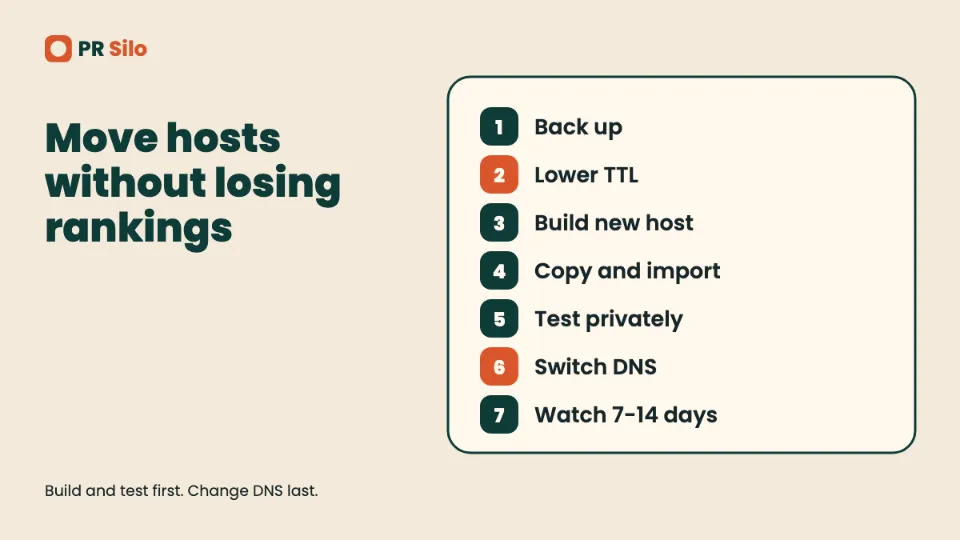
- Back up everything. Files, databases, email, DNS records and SSL files. Note the PHP version, cron jobs and mail records (MX, SPF, DKIM) too.
- Lower the DNS TTL. Set it to 300 seconds at least 24 to 48 hours before the switch so the old value can expire.
- Set up the new host. Create the account, install the stack and get a certificate ready.
- Copy files and import the database. Update the database connection details in your configuration file.
- Test on a temporary URL or a local hosts file entry. Click through forms, logins and checkout while the public site still points at the old host.
- Switch DNS. Change the A record or nameservers at a quiet hour.
- Watch for a week or two. Keep the old host alive for 7 to 14 days as a safety net.
Email is the step people forget. A nameserver change can overwrite MX records and send messages into a void, so confirm mail records before the switch.
How to Transfer a Website to a New Host
The process for how to transfer a website to a new host is the list above, but many hosts will do the file copy for you. Ask about the free migration service before paying for anything. Keep your URLs identical if you can. If any URLs change, set 301 redirects from old to new and run a crawl afterwards. Our on-page SEO services include post-move checks for lost redirects, stray noindex tags and broken canonicals.
How to Move a WordPress Website to a New Host
For how to move a wordpress website to a new host, you can use a migration plugin or copy the files and database by hand. The manual route: export the database, copy the wp-content folder and the wp-config.php file, import the database on the new host and update the database name, user and password in wp-config.php. If the domain stays the same, skip the search-and-replace. If it changes, run one across the database. Disable caching and security plugins during the move, then switch them back on once the site loads correctly.
How to Find the Host of a Website
Knowing how to find the host of a website pays off when you inherit a project, plan a migration or need to report abuse. The same steps explain how to find out who hosts a website you’re about to compete with or buy. It takes about two minutes:
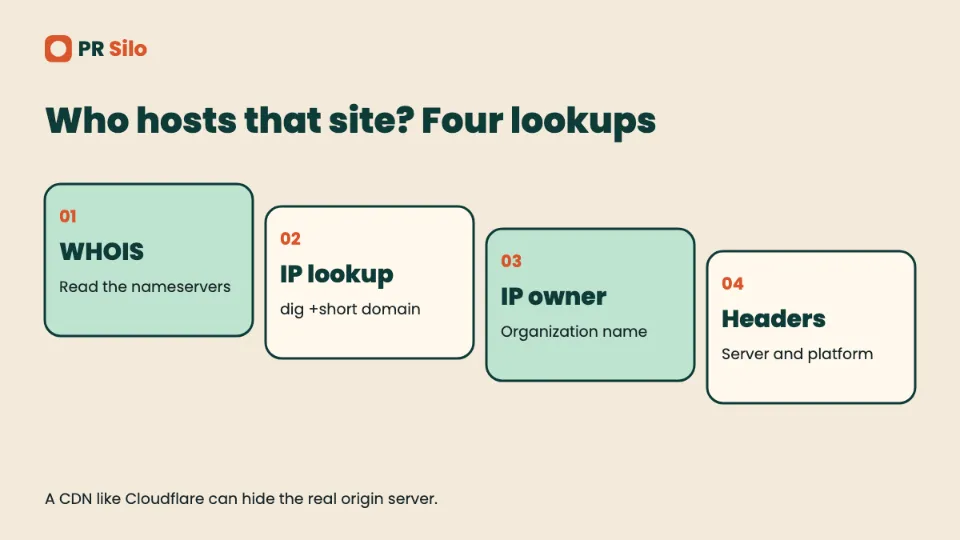
- Run a WHOIS or RDAP lookup through the ICANN lookup tool and read the nameservers. A name like ns1.siteground.com usually points to the host.
- If the nameservers are generic, get the site’s IP address with
dig +short example.comor an online DNS lookup. - Look up who owns that IP with a WHOIS search on the address itself. The organization name usually gives the provider away.
- Check the HTTP response headers, which sometimes name the server software or platform.
- If a tool such as dnsrobot or hostingchecker.net is faster, use it. It combines these signals for you.
One catch. Sites behind a CDN like Cloudflare show the CDN’s address, not the origin server’s, so the lookup returns Cloudflare. That limit applies to everyone who tries how to find out who hosts a website, and the origin often stays hidden on purpose.
How to Host a Website: Quick Answers to the Questions People Type Most
Searchers phrase the same problem a dozen ways. These are the direct answers, grouped by what the person wants to get done.
How to Host a Website Step by Step, for Beginners
If you want how to host a website for beginners 2026 in one breath: build or install the site, buy a host, point a domain at it, upload the files, turn on HTTPS. That is how to host a website step by step, and it’s also how to host a website for beginners with no server experience. How to make a website and host it, how to build a website and host it and how to build and host a website all describe the same two jobs, making the pages and giving them a home. How to build and host a website from scratch adds hand-written HTML to the front of that list. How to build and host a website for free swaps the paid host for a free static one.
How to create a website and host it for free and how to create and host a website for free end at GitHub Pages, Cloudflare Pages or a builder’s free tier. How to make a website host, or how to get a host for a website, just means picking a company from the comparison table earlier. How to use a website host comes down to the control panel. Look for a file manager, a domain section, an SSL toggle and a one-click installer.
How to buy a domain and host a website is two purchases that don’t have to come from one company. How to host a website after buying domain means pointing the domain’s nameservers or an A record at the host. How to host a website domain is the same DNS step. How to host a website domain for free is possible if the host bundles a first-year domain, though renewal is then yours to pay.
How to make your own website without a host is a real question with a real answer. You can’t put a site on the public internet without something serving it, but you can skip a paid company by using a free static host or by self hosting.
How to Host a Website Using GitHub
How to host a website using github, how to host a website with github, how to host a website from github, how to host a website in github, how to host a website github and how to use github to host a website all mean GitHub Pages. How to host a github website and how to host a website for free on github mean it too. How to host a website on github pages: push your files to a repository, open Settings, choose Pages, pick the branch and save. How to host a website on github for free is the same, since Pages costs nothing for public repositories. How to host a static website on github and how to host a html website on github follow the identical path with a plain index.html. The full walkthrough sits in the GitHub section earlier.
Cloudflare, Vercel and Other Free Routes
How to host a website for free 2026 still points at the same four names: GitHub Pages, Cloudflare Pages, Netlify and Vercel. How to host a website on cloudflare for free, how to host a website for free on cloudflare and how to use cloudflare to host a website describe connecting a Git repo to Pages. How to host a static website on cloudflare is the same flow without a build step. How to host a website for free on vercel is import the repo and deploy, which Vercel does in a minute or two. How to host a website for free online and how to host a website for free reddit are searches for opinions, and the opinions mostly agree on those same hosts. How to host a django website for free and how to host a php website for free usually need a free tier on a platform that runs server code, because Pages-style hosts only serve files. How to host a php website with mysql database and how to host a website with database both need a real server or shared plan that includes MySQL.
How Much Does It Cost to Host a Website? Quick Numbers
Short versions, using the ranges from the cost section above.
How much is it to host a website, how much does a website cost to host and how much it cost to host a website all land at $2 to $10 a month for shared hosting. What does it cost to host a website and what is the cost to host a website get the same range, with $0 for static sites and a few hundred for dedicated servers. How much does it costs to host a website is just a typo-flavored version. How much should it cost to host a website? For a small business, $5 to $25 a month is a sensible budget. How expensive is it to host a website, or how expensive to host a website, depends on traffic. A brochure site is cheap and a busy store is not.
How much does it cost to host a simple website is as little as nothing on free static hosting. How much to host a website for a year multiplies the monthly figure by twelve, or less if you pay a promo rate upfront, and how much to host a website per year usually lands between $24 and $120 for shared hosting. How to host a website cheap and how to host a website for cheap start with a three-year promo plan on shared hosting, as long as you accept the renewal jump.
On specific platforms: how much does it cost to host a website on wix and how much to host a website on wix both start at Wix’s paid plans, roughly $17 to $39 a month. How much to host a website on squarespace and how much is it to host a website on squarespace point at the $16 to $19 starter tier. How much does wordpress cost to host a website and how much to host a website on wordpress share the $3 to $25 band. How much is it to host a website on amazon, or how much does it cost to host a website on google, depends on usage-based billing, so a small static site stays near a dollar a month while a busy app doesn’t. For a country angle, how much it cost to host a website in india, how much to host a website in nigeria and how much to host a website uk all depend on the host’s local pricing and currency. Compare the renewal rate in rupees, naira or pounds before you buy, because exchange rates and taxes change the number.
How to Find Out Who Hosts a Website
How to find the host of a website was covered in its own section. The other phrasings all use the same four lookups: how to find out the host of a website, how to find out what host a website is using, how to find the web host of a website, how to find web host of a website, how to find host of a website, how to find a website host, how to find out a website host, how to find out who host a website, how to find who host a website, how to determine the host of a website, how to know the host of a website, how to tell what host a website is using, how to check what host a website is on and how do i know who my website host is.
Can you see who hosts a website? Yes, in most cases. A lookup of the domain’s IP address and the network that owns it will usually name the host. Who host a website, or who hosts a website domain, is different from who registered the domain. How to find the domain host of a website means the registrar, and a WHOIS lookup shows that. Where is my web site hosted is the same question about your own site, and your hosting invoice answers it fastest.
Moving a Website to a New Host
How to migrate a website to a new host, how to move a website to a new host, how to move my website to a new host, how to move a website from one host to another and how to transfer a website from one host to another all follow the eight-step process above: copy files, export the database, set up the new host, test on a temporary URL, lower the DNS TTL, switch DNS, then watch for problems. How to transfer a wordpress website to a new host is the same job with a migration plugin or a manual database import.
Hosting It Yourself
How to self host a website for free and how to self-host a website both mean running the server on hardware you control. How to host your own website, how to host your own web site and host your own website are the broad versions. Can i host my website myself, can you host your own website at home and what do you need to host a website all share one answer: a computer that stays on, a web server like Nginx, a way to reach it from outside, and patience for security updates. Who hosts a website that is self-hosted? You do.
How to Host a Website Safely: Security Basics Before Launch
A handful of habits prevent most of the pain once you know how to host a website and the site is live. Serve everything over HTTPS and redirect plain HTTP. Turn on two-factor authentication at your host, registrar and DNS provider, since losing any of those loses the site. Keep software patched. Store backups off the server and restore one at least once, because an untested backup is a hope. On servers you manage, use SSH keys and a firewall.
Once the site is live, hosting is only the foundation. Crawlability, speed and authority decide whether anyone finds it, which is the work of off-page SEO and digital PR.
Web Hosting Explained: Services, Providers, Plans and Terms
The rest of the vocabulary people search around hosting, defined in plain words. Skim it for the term you tripped over.
What Web Hosting Is, in Plain Terms
Web hosting, or webhosting if you see it written as one word, is a rented place on a server where your website files live. A website hosting service keeps that server online, powered and connected. Hosting website files means storing them there, and web site hosting is the older spelling of the same idea. The machines sit in data centers, buildings with backup power, cooling and fast network links. Some people call it internet hosting service or online hosting, and the web hosting company that sells it handles the hardware so you don’t have to.
How to host websites in general is the same story. How to host the website you just built means choosing a host, moving the files and connecting a name. How to host a website for my business? Pick a business website hosting plan with backups and real customer support. Business hosting web searches and company web hosting searches mean the same thing. Web hosting for businesses, web hosting for professionals and professional web hosting add priority support, staging sites and uptime guarantees. Small business web site hosting leans toward shared or managed plans, because small businesses rarely have anyone to run a server. Growing businesses outgrow those and move to VPS or cloud, and web hosting solutions or a web hosting solution is the sales name for that upgrade path.
Hosting Types and Plans
Different types of hosting exist because sites differ. Types of web hosting and types hosting searches usually want the same list:
- Shared hosting puts many sites on one server and is cost effective for new sites. Hosting shared and hosting shared hosting are the casual phrasing.
- Hosting vps and hosting vps hosting give you a virtual private slice of a bigger machine. A virtual private server, or private server vps, gets its own resources, and shared hosting vps is the usual upgrade comparison.
- Dedicated hosting, also written hosting dedicated hosting, hands you a whole server.
- Cloud hosting, or hosting cloud hosting, spreads your site across many machines.
- Managed hosting means the company handles updates, security and performance for you.
- Hosting wordpress hosting is the clumsy phrase for plans tuned to WordPress.
- Web server hosting and hosting web server describe renting the server itself. Web hosting server and hosting server are the loose versions.
Web hosting plans, website hosting plans, web hosting packages, web hosting package and web hosting options all point at the plan menu on a host’s pricing page. Web hosting prices follow the ranges earlier in this guide. Hosting options include shared, VPS, dedicated and cloud. Hosting requirements depend on your software, so check the PHP version, database type and storage your site needs. Hosting web hosting, hosting for website, hosting for a website and hosting service for website are all just “I need hosting.”
Providers, Companies and Where to Buy
Web hosting providers, web hosting provider, website hosting providers, website hosting provider, hosting provider, hosting providers, hosting service provider, web hosting service provider and hosting company are the businesses that rent you space. Website hosting companies, website hosting company and web hosting companies are the same list. Web hosts, website hosts, web site hosts, web site host and web host services come up when people want a shortlist, and website providers is the vaguest of them.
Hosting services for websites and web host services cover what comes in the box: storage, bandwidth, email, backups and a control panel. Website hosting services and web hosting sites are the comparison pages that review them. Hosting sites and hosting site are the same. Web hosting platforms, web hosting platform, hosting platforms and website hosting platforms usually mean companies with their own dashboard and tooling. Web hosting com is just the domain-style way people type it.
To buy hosting, buy web hosting, hosting buy or buy a web hosting service, compare the renewal price, the refund window and what’s included. Best hosting, best host for website, best web site host and best website hosting sites searches mostly want a ranked list. A fair ranking depends on your site, so treat any universal “best” with suspicion. Best web hosting for personal site and best personal website hosting suit a small shared plan. Personal website hosting, personal web hosting and secure website hosting follow the same logic, with HTTPS, backups and updates on the checklist. Affordable hosting and cheap hosting sites mean low prices, which is fine as long as you read the renewal line. Simple web hosting, simple website hosting, easy web hosting and basic web hosting mean beginner-friendly plans with one-click installers.
Free Hosting, Free Domains and Free Web Space
How to host a free website and how to host a website free both mean a $0 host. Free web hosting, free hosting, free hosting sites, free hosting website, free hosting websites, free web host, free web hosts, free webhost, free webhosting, free website hosts, free web hosting sites, free web hosting services, free web hosting service, free web hosting providers, free web page hosting, free web site hosting, free website hosting services, free site hosting, free web hosting page, host website for free, host website free, host free website, free web server and free web-space are one family of searches with the same answer. Web hosting free, website hosting free, best free hosting, best free web hosting, best free website hosting and top free web hosting want a ranking. Hosting gratis is the Spanish phrase for the same thing. Free web space, free webs space and freeweb space are older terms for the little slice of a server that early free hosts handed out, and the typo-heavy variants of them (fre web space, free web speace, free web spece, frre web space, freee web space, web sapce) lead to the same hosts. Free hostings, free website with hosting and website hosting canada free all mean a free plan, and the Canadian version just adds a location. Wix free and the Wix free plan are examples of a builder’s free tier, which carries ads and a branded address.
Free domain name, free domain hosting and free domain web hosting are different bargains. A free domain name usually means a free first year with a paid host plan. Web hosting with free domain, free domain name and hosting, free hosting and domain, free domain and web hosting, free web hosting and domain, free website hosting and domain, free domain hosting and domain explained simply: the registrar still bills you at renewal.
Domains, Names and Addresses
A website domain is the name people type, like example.com. Website domain name, domain name example, domain name address and web address are different words for it. A domain registrar sells you the name, and best domain registrars lists compare prices and renewal terms. To register domain or register domain name, search for the name, check availability, pay, then connect it. To check domain or check domain name availability, use a registrar’s search box. Need domain and need domain name come from people who have a site but no address.
Domain hosting, domain hosting services, domain hosting service, web domain hosting, web hosting and domain, web hosting domain, web hosting domains, web hosting and domain name, domain name and web hosting, website domain and hosting, website domain hosting, website domains hosting, website domain host, domain web hosting, domain web host and hosting domain all sit at the overlap of two products. A domain is the address. Hosting is the building. To connect domain to host, edit DNS records. The dns domain name system translates names into IP addresses, and a domain name web host is whichever company holds your files. Name web hosting and name domain name are trimmed versions of those. Domain name domain, domain web, hosting domain name and hosting domain are shorthand for the pairing. Domain explained simply: it’s a human-readable label for a number.
Builders, CMS and Drag and Drop Tools
A website builder bundles hosting, templates and an editor. Wix web hosting, wix hosting, wix website hosting and wix hosting plans are included in each plan. Choose website builder if you want drag drop editing and don’t want to touch a server. A drag drop editor lets you move blocks around a page, and builder hosting is the hosting that comes inside that product.
A content management system, or content management, stores your pages in a database and lets you edit them in a browser. Management system and management system cms are shorthand, and WordPress is the biggest example. Content website and website files are what the CMS produces. Build website and building website mean assembling those pieces, and site html css means the plain-code version. Web design hosting is hosting bought alongside design work, and web service hosting is the same for web apps.
Technical Terms You Will Hit
Technical skills and advanced technical skills matter most for self hosting and self hosted server setups, because you handle patching and backups. Self hosting means running it yourself. File transfer protocol, usually shortened to FTP, is the classic way to upload files, and FTP clients show a file explorer view of your server. Stores website data and website steps are the kind of phrasing that comes from beginner guides. Hosting webpage terms such as web page hosting, webpage hosting, web page hosting free, webpage hosting services and webpage servers all describe the same thing at a smaller scale.
Security features worth looking for are free SSL, a firewall, malware scanning and automatic backups. HTTPS, shown in a URL as https www, tells visitors the connection is encrypted. On a server, certificates sit in a directory such as /etc/ssl/certs. Page load speed and website performance depend on server location, caching, image sizes and code weight. Faster page load speed helps both visitors and rankings. Beginner friendly dashboards matter for first-timers, and an around clock support team matters when your site fails at midnight. Pros cons lists for each plan are worth reading before you pay. Publishing website just means making it live. Choose web hosting, choose web, choose web host and can host come up when someone’s about to buy.
GitHub Pages sites live at a github io address until you add a custom domain. Find website and address website queries are people hunting for a site’s location, and web hosts that give you a site address usually include a temporary URL. Hosting and web hosting are, finally, the part nobody notices until it breaks.
A Few More Phrasings, Answered
Web site hosting services, web site hosting service, webhosting service, webhosting services and online hosting services are all the same product sold under different names. So are online web hosting, web hosting offer and web site host service, which show up on promo pages. Websites hosting and web hosting websites are the plural versions. A website hosting server is the machine, and server web server setups pair the hardware with software like Apache or Nginx. Web hosting software means the control panel and server stack, such as cPanel, Plesk or a plain Nginx install.
Host a site, host your website, hosting your own website and hosting the website all describe the act. Hosting a website locally is covered in the local section above. Web host free is the shortest way to ask for a free plan. Website hosting domain is a bundle of both. Types web hosting is the list in the plans section. A guide beginners can follow starts with the five steps near the top. Files data, from images to databases, must move together when you migrate, and a site owner can easily check which host serves a site with the lookups above. Anyone who want use a free plan should read its limits first.
Frequently Asked Questions About Hosting a Website
What is web hosting?
Web hosting is the service that stores your website’s files on a server connected to the internet and delivers them to visitors’ browsers on request. You can rent that server space from a provider or run your own machine.
Can you host a website for free?
Yes, if the site is static. GitHub Pages, Cloudflare Pages, Netlify and Vercel’s Hobby plan all serve static sites at no cost, with limits on bandwidth, builds or commercial use. Dynamic sites with databases usually need a paid plan.
Can I host my own website at home?
You can, if your internet provider gives you a public IP address and allows inbound traffic, or if you use a tunnel service. Expect to handle security, backups and uptime yourself, and expect residential connections and power cuts to limit reliability.
Do I need both a domain and hosting?
Yes, unless a builder or platform gives you a free subdomain and you’re happy with it. The domain is your address and the hosting stores your files. They’re bought separately but often at the same company.
How much does it cost to host a website?
Shared hosting commonly costs $2 to $10 a month, VPS plans $10 to $100 and dedicated servers $80 to $500. Free static hosting exists for simple sites. Always check the renewal price, which can double the introductory rate.
Which type of hosting is best for my site?
A static site fits a free static host. A small WordPress or business site fits shared or managed WordPress hosting. A custom app or growing site fits a VPS or cloud plan. A high-traffic or compliance-heavy site may justify a dedicated server.
How long does DNS propagation take?
Usually a few hours, sometimes minutes and occasionally a day or two, depending on cached TTL values. Dropping the TTL to 300 seconds a day or two before a switch keeps the window short.
Where can I host a website for free?
A static site goes on GitHub Pages, Cloudflare Pages, Netlify or Vercel’s Hobby plan. A PHP or WordPress site needs a free shared host, which comes with caps and no email.
What do you need to host a website?
A domain name, a host, your site files and an SSL certificate. Self hosting adds a server that stays online and a web server program.
Who hosts a website, and can you see who hosts a website?
A hosting company does, unless the owner runs the server. You can usually see it by looking up the domain’s IP address and the network that owns it.