
Your site ran fine on a three-dollar plan. Then a newsletter went out, six hundred people clicked inside the same ten minutes, and the homepage took nine seconds to load. That’s usually the week somebody types what is VPS hosting into Google.
Quick answer first. It’s the step between a cheap shared plan and renting a whole machine. You get your own walled-off piece of a server, with its own memory, its own disk and its own operating system, for somewhere between $5 and $25 a month.
I run an SEO agency & I don’t sell servers, and nobody pays me to push a plan. I see hosting from the other end: slow pages, crawl stats that sag, checkouts that time out in the middle of a sale. So this is VPS hosting explained by someone with nothing to sell you: how it works, what it costs after this year’s price jump, which type fits which job, and when it’s more than you need.
The 30-Second Version
- A VPS is one big machine split by software into isolated virtual machines. You rent one of them.
- Your memory and disk are reserved. Other customers on the same hardware can’t touch them.
- You get root access, so you can install nearly anything.
- In November 2026, decent entry plans cost about $4.50 to $9 a month. Management and control panels cost extra.
- Prices rose this year because server memory got expensive.
- It suits online stores, busy WordPress sites, custom apps and always-on tools. A five-page brochure site doesn’t need one.
What Is VPS Hosting, in Plain English?
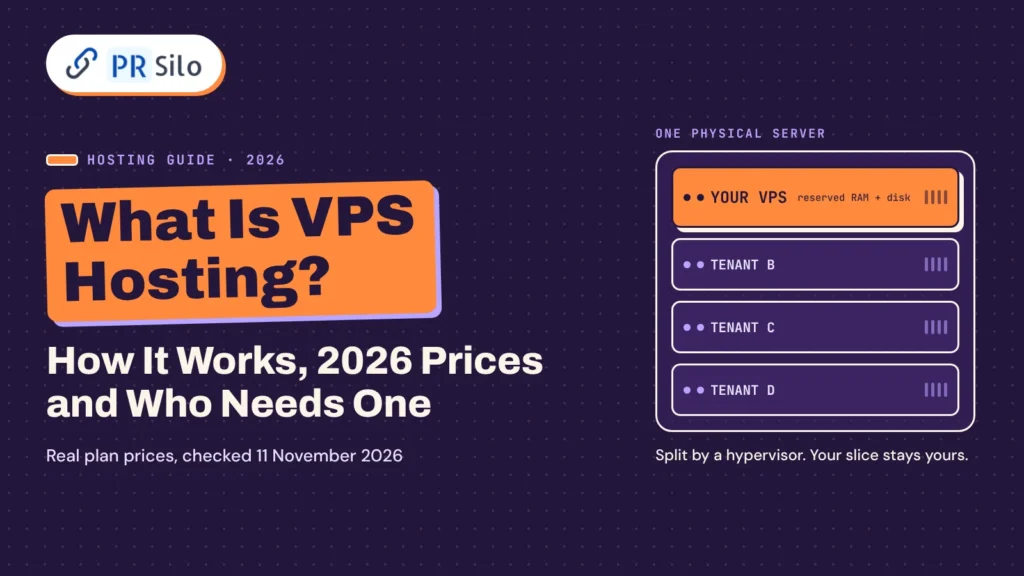
VPS stands for virtual private server. Picture one powerful physical computer sitting in a data center. Software slices it into several virtual servers. Each slice boots its own operating system, gets its own share of memory and disk space, and behaves like a separate computer. A hosting provider rents those slices out by the month. That rental is VPS hosting.
The two adjectives do real work. Virtual means the machine is created by software instead of being built from its own metal. Private means the resources assigned to you are reserved for you, and nobody else on the box can read your files or eat your memory. IBM’s own explainer admits the word oversells things a bit, and that’s fair: the hardware underneath is still shared. What’s private is your allocation.
The housing comparison everyone reaches for still holds up. Shared hosting is a hostel dorm. It’s cheap, and you live with whatever the other guests get up to. A dedicated server is a detached house, all yours and priced like it. A VPS is an apartment: your own front door, your own kitchen, one building.
You’ll meet the same product under other names. A virtual server. A virtual dedicated server, or VDS. Some people say virtual private machine. Polish hosts list serwery VPS. The labels change and the idea doesn’t, though a few companies keep “VDS” for plans with dedicated CPU cores, so read the spec sheet and ignore the badge.
People type the question a dozen ways: what is VPS web hosting, what is a VPS hosting service, what is virtual server hosting, what is VPS in hosting terms. They all want the same sentence. So, what is VPS hosting in one line? You rent a guaranteed slice of somebody else’s computer and run it as your own private server. When a client asks me to define VPS hosting, that’s the sentence I use.
How VPS Hosting Works
Fair warning, this is the nerdy part. Still, the answer to what is VPS hosting and how does it work fits in four steps.
- The provider racks a large machine: dozens of CPU cores, hundreds of gigabytes of RAM, fast disks.
- A program called a hypervisor sits on that hardware and carves it into virtual machines.
- Each virtual machine receives a quota (say 2 vCPU, 4 GB of RAM and 80 GB of disk) and starts its own system. Ubuntu, Debian, AlmaLinux and Windows Server are the usual choices.
- You log in over SSH, or Remote Desktop on Windows, with full administrator rights and install what you like.
That hypervisor layer is the virtualization technology everything else leans on. It hands out the hardware resources and it keeps tenants apart. If the site next door gets hammered by bots, its VM hits its own ceiling. Yours carries on.
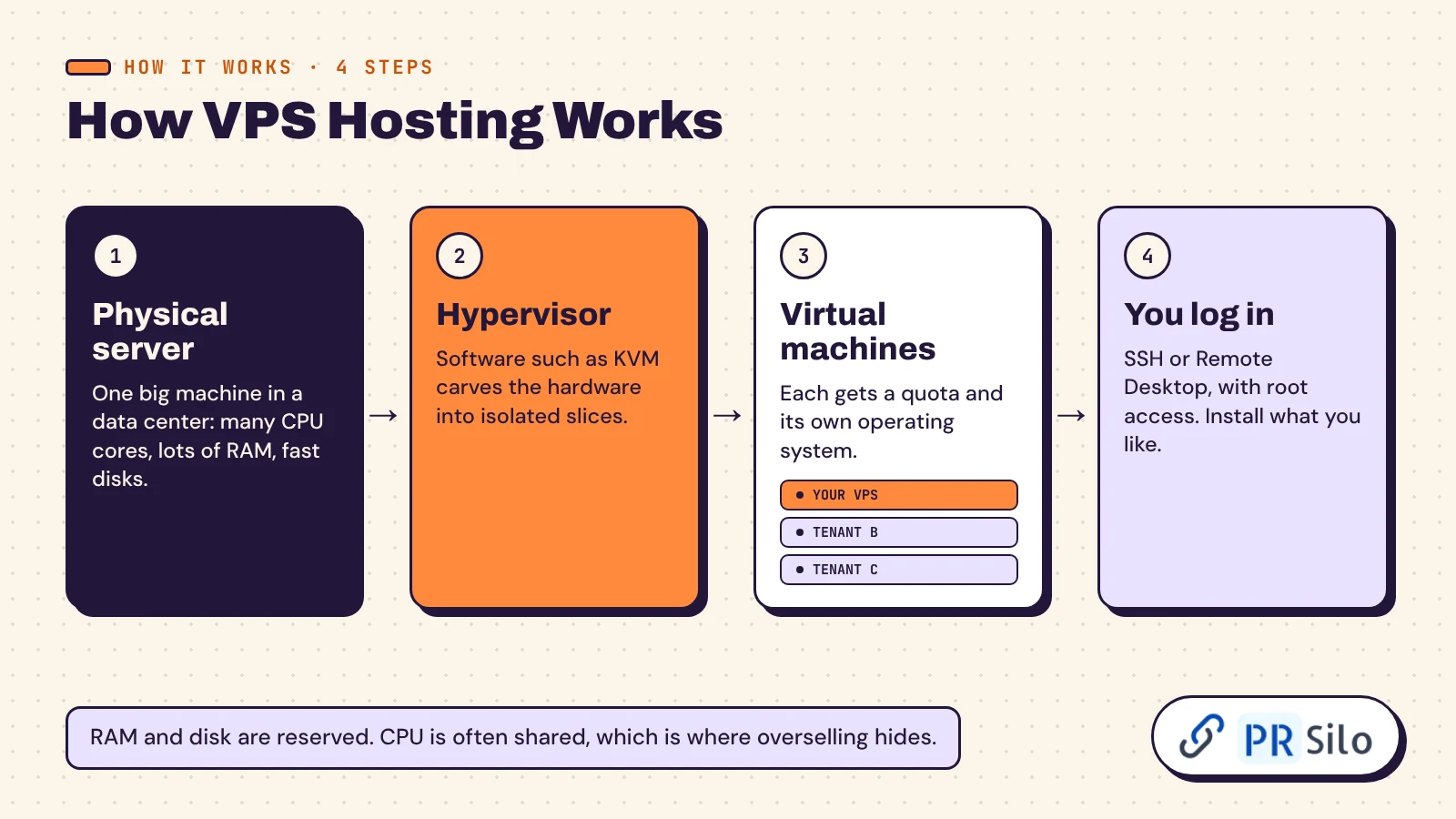
One caveat the sales pages skip. A vCPU isn’t always a whole physical core. On cheaper plans the company hosting VPS customers sells more vCPUs than the machine has cores, betting that not everybody is busy at the same moment. Most days the bet pays off. When it doesn’t, your server feels sluggish for no reason you can find. RAM and disk are normally guaranteed. CPU is where overselling hides.
What Is KVM VPS Hosting?
KVM, short for Kernel-based Virtual Machine, is the hypervisor built into Linux. It has shipped inside the kernel since 2007. Hostinger and Namecheap both say they run their VPS ranges on it. Every KVM guest has its own kernel, so you can run almost any of the common operating systems and load your own kernel modules.
The older alternative is container-style virtualization (OpenVZ and LXC), where every tenant shares the host’s kernel. That’s lighter and cheaper to run, and easier to oversell. If two plans look identical and one says KVM, take the KVM one. Xen, VMware and Hyper-V also turn up on spec sheets, and all three are full virtualization as well.
VPS vs Shared vs Dedicated vs Cloud
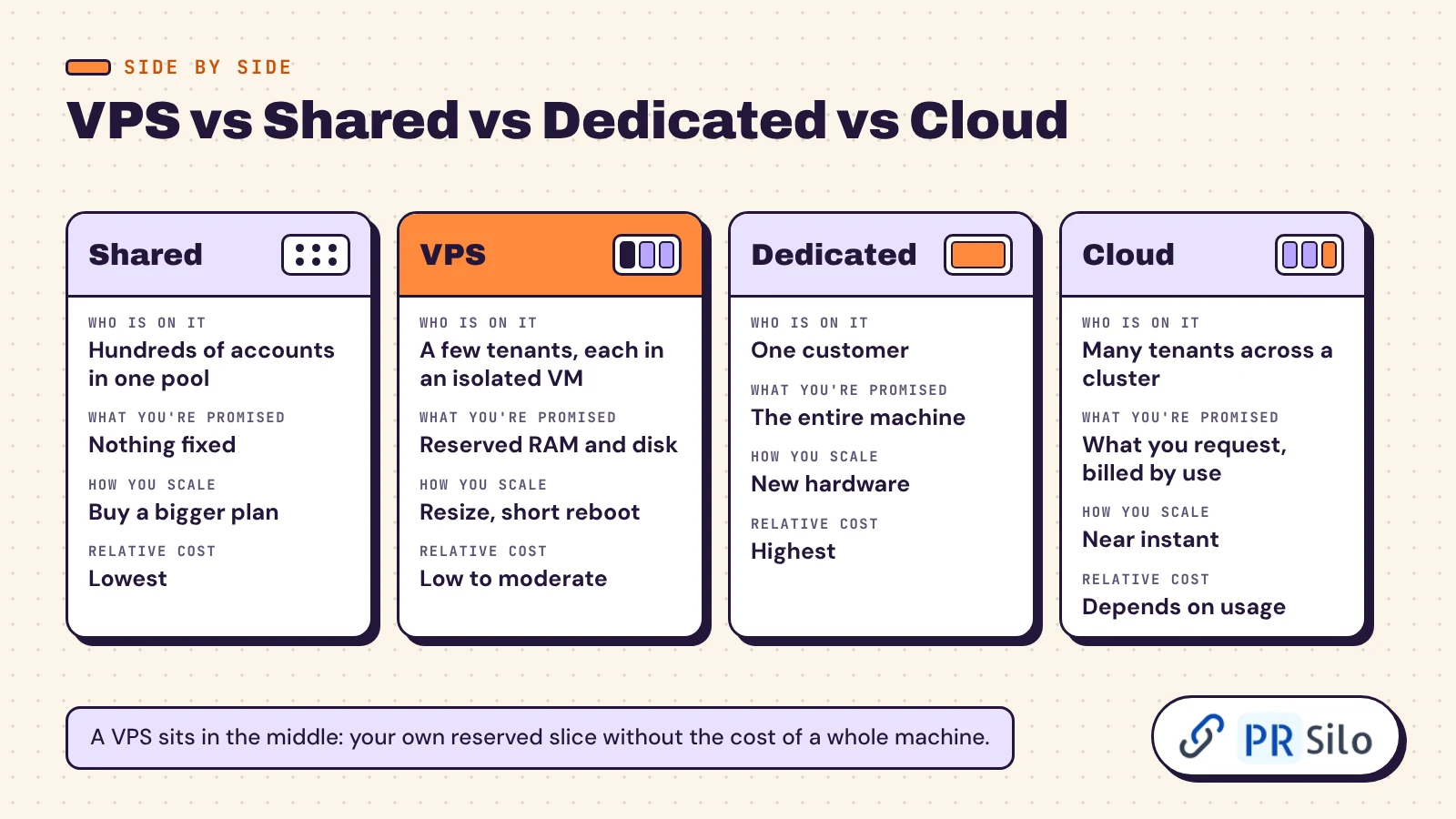
Hosting comes in four basic shapes. The differences come down to who else is on the machine and how the hardware resources are divided.
| Shared | VPS | Dedicated | Cloud | |
|---|---|---|---|---|
| Who is on the hardware | Hundreds of accounts in one pool | Several tenants, each in an isolated VM | One customer | Many tenants across a cluster |
| What you’re promised | Nothing fixed | Reserved RAM and disk, a share of CPU | The entire machine | Whatever you request, billed by use |
| Root access | Rarely | Yes | Yes | Usually |
| How you scale | Buy a bigger plan | Resize from a dashboard, short reboot | New hardware or a migration | Near instant |
| Skills needed | None | Some, unless it’s managed | Plenty | Plenty |
| Relative cost | Lowest | Low to moderate | Highest | Depends on usage |
Shared hosting vs VPS is the comparison most readers care about. On a shared plan every site draws from one pool and runs the same software. Cheap, easy, and exposed to the noisy-neighbour problem: someone else’s traffic spike or hacked plugin becomes your slow afternoon. A VPS costs more because your share is fenced off.
Dedicated hosting hands you the whole box. A close cousin is sold as bare metal, usually with hourly billing and faster setup. No neighbours, every core is yours, and you pay for capacity you may never use. Most sites don’t need dedicated servers. A mid-size VPS runs a busy online store without complaint.
What Is Cloud VPS Hosting?
A classic VPS lives on one physical machine. If that machine dies, you’re offline until somebody fixes it. Cloud VPS hosting spreads the same idea across a cluster. Your disk sits on networked storage, and when a node fails your VM restarts on another one. That’s the practical gap between a plain VPS and a cloud VPS.
Cloud hosting in the hyperscaler sense (AWS, Google Cloud, Microsoft Azure) goes further, with per-second billing, a few hundred add-on services and pricing calculators that need their own tutorial. The big cloud providers know that scares people off, so they sell simplified versions. Amazon Lightsail bundles a VM, an SSD and data transfer into one flat price from $5 a month. When someone asks about VPS cloud hosting or a VPS cloud server, this middle ground is nearly always what they mean: VPS simplicity on cloud plumbing.
What Are the Benefits of VPS Hosting?
Why VPS hosting, and not simply a bigger shared plan? Because the gains are different in kind.
Speed you can predict comes first. Your RAM is yours, so a neighbour’s viral post doesn’t slow your checkout. That steadiness does more for website performance than raw horsepower.
Then control. Root access lets you choose the PHP version, the database, the cache and the firewall rules. Need Redis, a queue worker or some odd piece of custom software? Install it.
Isolation matters too. A compromised site on the same hardware can’t read your files.
You get room to grow. Most hosting services let you add RAM or CPU from a dashboard in a couple of minutes. Going down is harder, and shrinking a disk is often impossible, so start small.
Last, a dedicated IP address. It helps email deliverability and means you aren’t sharing a reputation with strangers.
Now the trade-offs, because there are some.
- Somebody has to patch it. An unmanaged VPS left alone for a year is a liability.
- It costs more than a shared plan.
- Extras add up fast: panel licences, backups, Windows.
- You still share a physical machine. For workloads with strict compliance rules about hardware, bare metal is the safer choice.
Is VPS good for hosting a normal business website? Yes, once the site earns money or pulls real traffic. For a hobby blog it’s a nice-to-have.
What Is a VPS Server Used For?
If you came here asking what is VPS hosting used for, the list runs well past “websites”. A server is just a computer that never sleeps and has a public address, and a small rented one turns out to be useful for a lot of jobs.
- Sites that have outgrown shared plans, and agencies keeping client sites together
- An online store that can’t stall during a sale
- Web apps, APIs and databases such as MySQL or PostgreSQL
- Staging copies and test environments
- Self-hosted tools like Nextcloud, Matomo and Gitea
- AI agents and chatbots that run around the clock
- Trading software that must stay connected
- Game servers, VPNs and mail servers (read the provider’s rules first)
A few of these come up so often they deserve their own answers.
What Is WordPress VPS Hosting?
It’s WordPress on a machine you control, usually installed from a one-click image. You feel the difference in wp-admin and at checkout, the pages that can’t be cached. And what is WooCommerce VPS hosting? The same setup with a shop attached. WooCommerce currently asks for PHP 8.3 or newer, MySQL 8.0 or MariaDB 10.6, HTTPS and a 256 MB WordPress memory limit. Plenty of bargain shared plans miss at least one of those. For a store with steady orders I’d start at 2 vCPU and 4 GB of RAM, add Redis object caching, and watch memory during the first promotion.
What Is Developer VPS Hosting?
Marketing shorthand for a VPS with the things developers want: root over SSH, an API, snapshots, Docker support and hourly billing. You install your stack, deploy with Git, and delete the machine when the experiment ends. Plenty of teams keep 2 VPS instances side by side, one for staging and one for production, so a bad deploy never touches live customers.
What Is n8n VPS Hosting?
n8n is an open-source automation tool. Think Zapier, except you host it. The Community Edition is free to run yourself, so the only bill is the machine. n8n publishes no official minimum hardware. Hostinger’s guide suggests at least 1 vCPU and 2 GB of RAM, and 2 vCPU with 4 GB for serious use. n8n’s own documentation is blunt that self-hosting is meant for people who are comfortable running servers. If that isn’t you, pay for n8n Cloud and skip the maintenance.
What Is the Best VPS for Hosting Chatbots and AI Agents?
This is a big new reason people rent small servers in 2026. Two questions show up in keyword tools again and again: what is the best VPS hosting for OpenClaw, and what is the best VPS hosting for Hermes Agent?
OpenClaw is an open-source assistant that runs on your own machine and talks to you through WhatsApp, Telegram, Slack and similar apps. It needs a current Node.js runtime, and most hosting guides settle on 2 vCPU and 4 GB of RAM as a comfortable start. Hermes Agent, from Nous Research, is lighter. Its README says it will run on a $5 VPS, because the language model is called over an API and the machine only keeps the agent, its memory and its schedule alive.
So “best” here has little to do with brand. Look for KVM, 2 to 4 GB of RAM, an NVMe disk, root access and a ready-made Docker image. Hostinger, IONOS and Contabo all sell preconfigured agent templates. One warning: these agents hold your API keys and can run commands. Lock the box down before you connect anything that matters.
How Does VPS Hosting Work for Forex Trading?
Automated strategies, called Expert Advisors, have to stay connected to the broker day and night. A home PC reboots for updates, the Wi-Fi drops, and a trade is missed. So traders rent a small Windows VPS in a data center near the broker’s servers and leave MetaTrader running there.
What is MetaTrader VPS hosting, then? It’s the built-in service from MetaQuotes, the company behind the platform. It costs $15 a month, or $10 a month on a yearly plan, and claims 84% of broker servers are reachable in under 3 milliseconds. It’s a stripped-down environment made only for running your robots and signal subscriptions. Otherwise, the best VPS hosting for MetaTrader 5 is any Windows VPS with low ping to your broker. Check latency before you check price.
Types of VPS Hosting: Managed, Unmanaged, Linux and Windows
Same product, very different experiences, depending on who looks after it and what it runs.
What Is Managed VPS Hosting and Who Needs It?
With managed VPS hosting the provider does the upkeep: system patches, security updates, monitoring, backups and usually the dashboard too. You get a ticket queue instead of a terminal. It’s the right call for business owners, small teams with no sysadmin, and anyone whose answer to “who patches this thing?” is silence.
The scope varies a lot. One managed VPS covers the operating system only. Another covers your applications as well. Namecheap sells management as an add-on on its larger plans: $10 a month for basic and $25 for complete. Ask for the list of what’s included before you pay. Managed hosting costs more, and for a non-technical owner it’s still cheaper than one bad weekend.
What Is Unmanaged VPS Hosting?
The company keeps the hardware and network alive. Everything above that is yours: updates, firewall, backups, and fixing whatever breaks at 2 a.m. (What is self managed VPS hosting? The same thing with a friendlier name.) It’s cheaper, and it’s the default at Hostinger, DigitalOcean, Hetzner and most low-cost hosts. It fits you if the command line feels like home. It doesn’t if server management sounds like a chore you’ll keep postponing.
Some hosts sell a middle tier called semi-managed. They patch the system, and you look after your apps.
What Is Linux VPS Hosting, and What Is Windows VPS Hosting?
Linux VPS hosting runs a distribution such as Ubuntu, Debian or AlmaLinux. There’s no licence fee, and it’s what WordPress, PHP, Python and Node.js expect. Windows VPS hosting runs Windows Server, which you need for ASP.NET, Microsoft SQL Server, MetaTrader and other Windows-only programs. The licence shows up on the bill. On Lightsail’s price list the smallest Linux bundle is $5 a month and the same size with Windows is $9.50. Unless a specific program forces Windows, pick Linux. Most hosts offer a menu of operating systems at checkout and let you reinstall later.
What Is Plesk VPS Hosting?
It’s a VPS that arrives with Plesk already installed. Plesk is a control panel: a web dashboard for sites, domains, email, databases and SSL, so you click instead of typing commands. It runs on both Linux and Windows. cPanel, with its WHM admin side, is the Linux standard.
Both are licensed per server, and the fees aren’t small. cPanel’s 2026 store prices run from $29.99 a month for a single account to $69.99 for a hundred, with another rise announced for 16 December. Plesk starts at $16.99 a month for ten domains. On a $6 machine the panel can cost three to five times the hosting. Free panels such as HestiaCP and aaPanel exist if you’d rather not pay.
What Is NVMe VPS Hosting (and SSD VPS Hosting)?
Both describe the disk. SSD VPS hosting uses solid-state drives on the older SATA interface, which tops out around 550 MB per second. NVMe drives connect over PCIe and run several times faster. Vendors’ own claims range from three times to OVHcloud’s “up to 6 times”. You notice it in database queries, in WordPress admin, in anything that reads and writes lots of small files.
What is fast NVMe VPS hosting? Marketing for the same thing. NVMe is now standard on entry plans at Hostinger, OVHcloud, GoDaddy and IONOS, so treat plain “SSD” on a 2026 price page as a yellow flag.
While you’re reading the spec sheet, remember that memory and disk are different things. Some listings blur them into a vague “RAM storage” line. RAM is working memory. Storage is disk space. If a page lumps the two together as RAM storage, ask for both numbers.
What Is Bandwidth in VPS Hosting?
Two different numbers get called bandwidth. One is port speed, meaning how fast data can move (500 Mbps, 1 Gbps). The other is monthly transfer, meaning how much you may move (1 TB, 4 TB). Hostinger’s entry plan includes 4 TB a month. Lightsail’s $5 bundle includes 1 TB.
What is unmetered bandwidth VPS hosting? A plan where transfer isn’t counted and only the port speed is capped. OVHcloud’s US range works this way, with unlimited traffic at 500 Mbps on its smallest plan. Unmetered never means infinite, so read the hosting provider’s fair-use clause.
You’ll also see “instant” setup advertised. What is instant VPS hosting? Automated provisioning, nothing more. You pay, and the machine is ready in a minute or two with no human in the loop.
How Much Does VPS Hosting Cost in 2026?
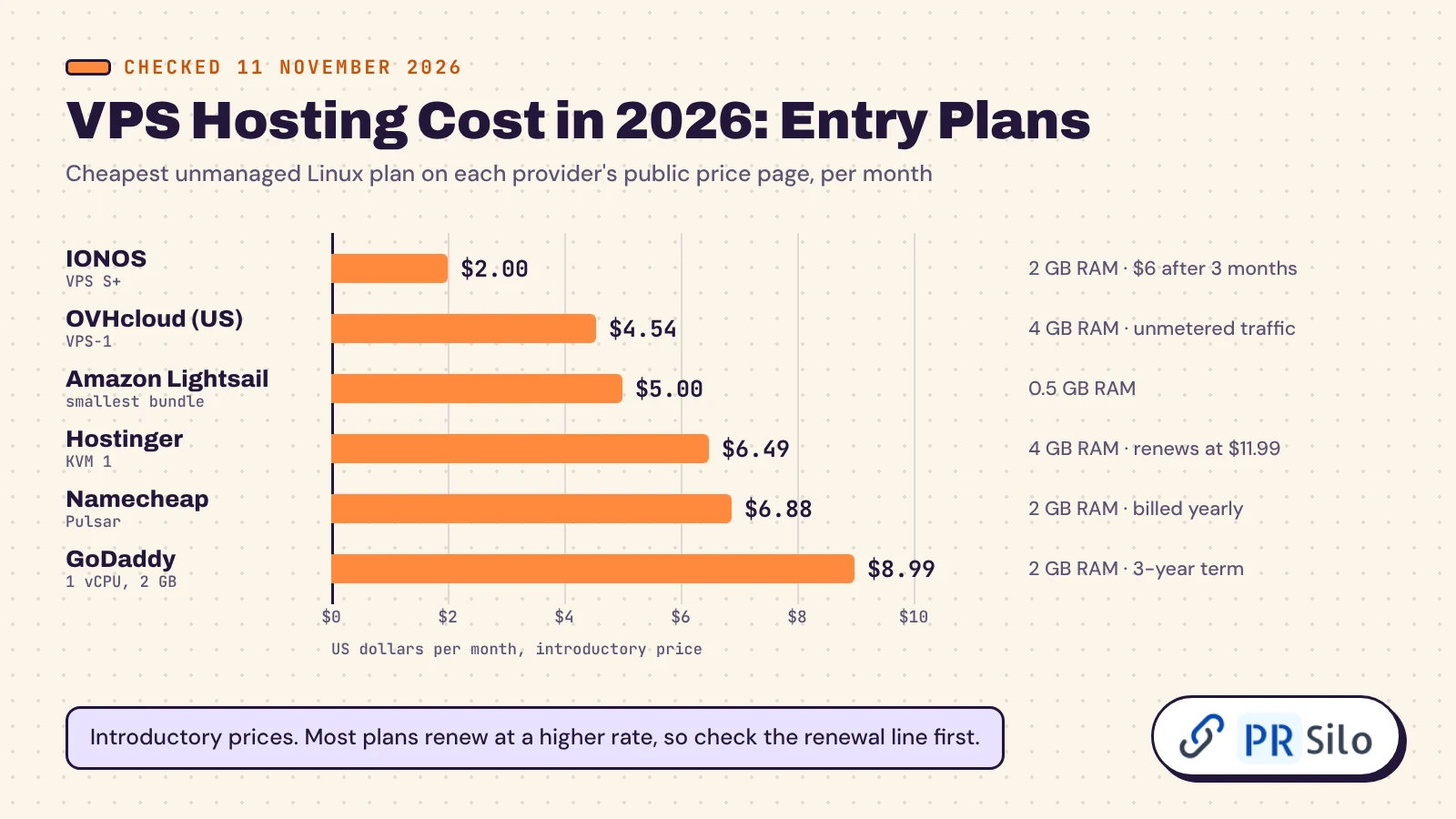
How much is VPS hosting right now? I checked the public price pages of six well-known providers on 11 November 2026. These are entry plans, unmanaged, running Linux.
| Provider | Entry plan | Price per month | What you get | The catch |
|---|---|---|---|---|
| Hostinger | KVM 1 | $6.49 | 1 vCPU, 4 GB RAM, 50 GB NVMe, 4 TB transfer | 24 months paid upfront, renews at $11.99 |
| GoDaddy | 1 vCPU, 2 GB | $8.99 | 40 GB NVMe, Linux only | Three-year term, list price $14.99 |
| Namecheap | Pulsar | $6.88 | 2 cores, 2 GB RAM, 40 GB SSD, 1 TB transfer | Billed yearly, renews at $106.56 a year |
| OVHcloud (US) | VPS-1 | from $4.54 | 2 vCores, 4 GB RAM, 40 GB NVMe, unmetered at 500 Mbps | A “starting at” price, so confirm the term at checkout |
| Amazon Lightsail | Smallest bundle | $5.00 | 2 vCPU, 0.5 GB RAM, 20 GB SSD, 1 TB transfer | Half a gigabyte of RAM is tight |
| IONOS | VPS S+ | $2.00 | 1 vCore, 2 GB RAM, 60 GB NVMe, unlimited traffic | $2 for three months on a one-year term, then $6 |
So how much does VPS hosting cost for a typical small business site? An unmanaged machine with 4 GB of RAM runs anywhere from about $5 to $24 a month depending on the provider. Plan on $25 to $50 once you add management or a commercial panel. Namecheap also lists a smaller Spark plan at $3.88. The entry tiers at DigitalOcean, Vultr and Akamai (the old Linode) sit around $4 to $6 for 512 MB to 1 GB of RAM. Google Cloud even has an always-free e2-micro instance in a few US regions, which is fine for tinkering and too small for a real site.
One habit will save you money. When you compare any VPS hosting price, put the renewal figure next to the intro figure. Hostinger’s entry plan nearly doubles after the first term.
Why VPS Prices Jumped in 2026
If your renewal quote looked wrong this year, it probably wasn’t a mistake. AI data centers bought so much memory that the price of server RAM and SSDs shot up, and hosts passed it on. OVHcloud’s chief executive said in August that the company was paying six times more for RAM than a year earlier, and warned of rises up to 87% on some new servers. Hetzner, for years the default cheap option in Europe, repriced its cloud range on 1 April and again on 15 June. The panel makers raised licence fees too.
What can you do about it? Lock in a longer term if you trust the host. Size RAM carefully, since it’s now the expensive part. And don’t expect a quick reversal: OVHcloud’s boss said he expects the squeeze to last until 2028.
What Is Cheap VPS Hosting and Is It Reliable?
What is low-cost VPS hosting, exactly? Anything under about $5 a month. You can go lower. Deal sites such as LowEndBox track $1 VPS hosting offers all year.
The catch always sits in the terms. That $1 is often a first-month promo, or an annual prepayment that works out to a dollar a month, or an IPv6-only machine that needs a proxy before many visitors can reach it. Specs are thin: one core, 512 MB to 1 GB of RAM, support by ticket if at all.
So what is the cheapest VPS hosting that is reliable? My answer is the cheapest plan from a company that publishes an uptime commitment and shows the renewal price up front. Today that means roughly $4.50 to $7 a month. Use $1 VPS hosting for experiments and throwaway projects. Don’t put a client’s shop on it.
The Costs Hiding Behind the Sticker Price
- The renewal rate after the intro term
- A panel licence, if you want cPanel or Plesk
- A Windows licence
- Extra backups and snapshots (OVHcloud includes one daily backup, and snapshots start at $0.40 a month)
- Additional IPv4 addresses
- Server management, if you don’t want to do it yourself
- Transfer overage on metered plans
Is VPS Hosting Secure?
More secure than a shared plan by design, and after that only as secure as you keep it. Isolation is the built-in part. Another tenant’s malware can’t cross into your VM, and an attack aimed at their site doesn’t drain your resources. Everything inside your machine is on you, and a fresh VPS gets probed by bots within hours of going online.
The short hardening list:
- SSH keys instead of passwords, and no direct root login
- A firewall that leaves open only the ports you use (UFW makes this a two-minute job on Ubuntu)
- Automatic security updates
- Fail2Ban or a similar tool to block repeated login attempts
- Backups stored somewhere else, restored at least once as a test
- DDoS protection from the host, which OVHcloud and several others include
If that list reads like homework you won’t do, you have your answer on managed versus unmanaged.
When to Upgrade From Shared Hosting to VPS
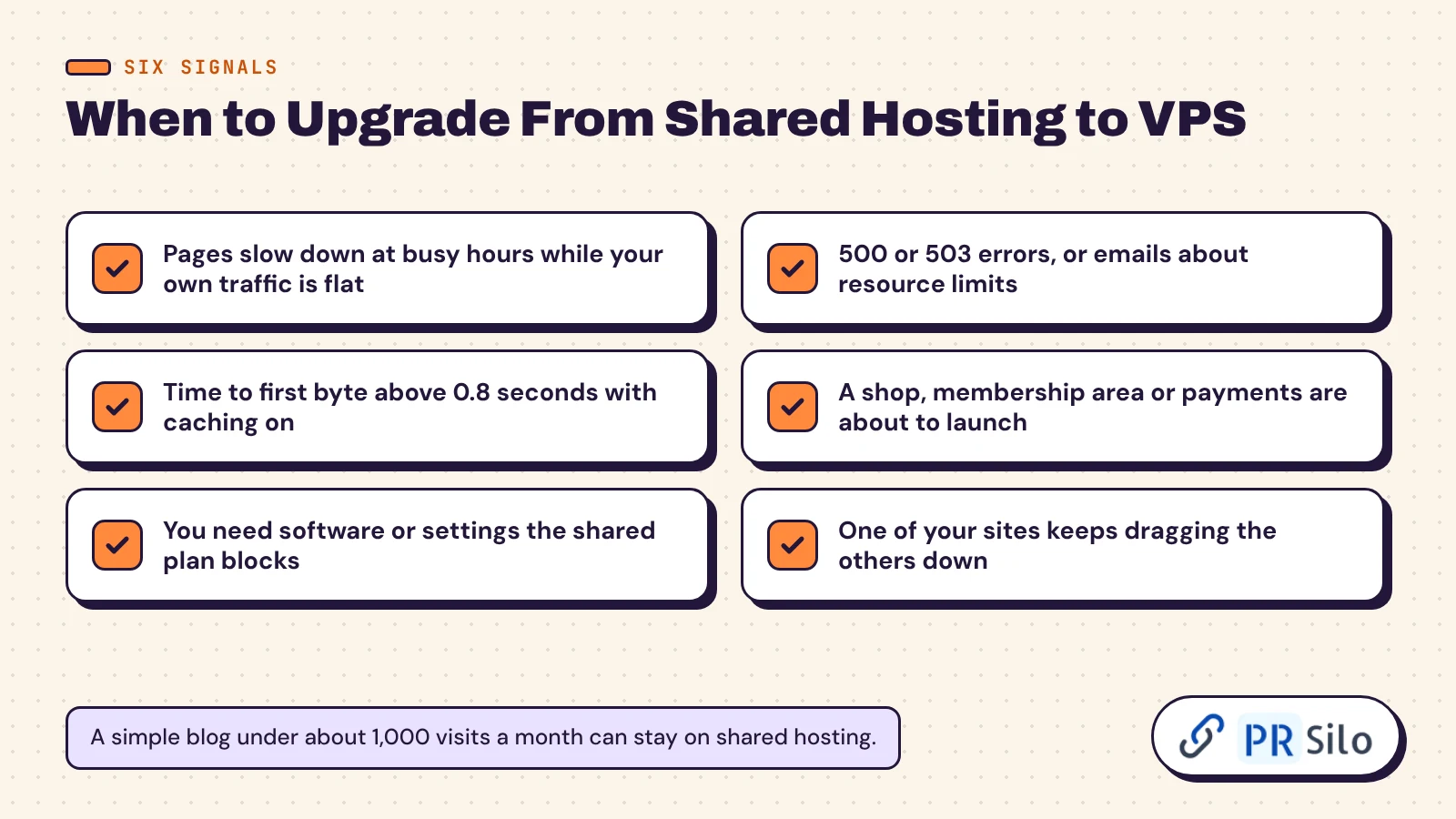
Not when a salesperson says so. Move when you can point to one of these.
- Pages slow down at busy hours while your own traffic is flat. That’s the neighbours.
- You see 500 or 503 errors, or your host emails you about resource limits.
- Time to first byte stays above 0.8 seconds with caching switched on. Google’s web.dev guidance treats 0.8 seconds or less as good and anything over 1.8 as poor.
- You’re launching a shop, a membership area or anything with logins and payments.
- You need custom software or settings the shared plan refuses to allow.
- You host several sites and one keeps dragging the rest down.
And when not to? My rough line is a simple blog under about 1,000 visits a month. Below that, spend the money on content.
How to Choose the Right VPS Hosting Plan
A VPS hosting plan is a bundle: vCPU, RAM, storage, transfer and a level of support. Decide in this order.
- RAM first. 1 GB runs a small site or a bot. 2 GB runs a WordPress site. 4 GB runs a store or a handful of sites. Heavy databases want 8 GB or more.
- Then the disk: NVMe, and enough of it for a year of growth.
- Then location, as close to your visitors as you can get.
- Then the management level.
- Price last, and judge it by the renewal figure.
Start one size smaller than you think you need. Moving up takes a click and a reboot. Moving down usually means migrating.
How to Choose a VPS Hosting Provider
The plan is half of it. The company behind it is the other half. Any hosting service worth paying for should pass this list.
- An uptime commitment in writing. 99.9% allows about 44 minutes of downtime a month. 99.99% allows under five. OVHcloud, GoDaddy and Namecheap all publish 99.9%.
- Modern virtualization technology (KVM) and NVMe storage.
- Backups: how often, how long they’re kept, and what a restore costs.
- Support hours and channels. Send a pre-sales question at an awkward time and see what happens.
- A refund window. Hostinger and Namecheap both give 30 days.
- A clear upgrade path and renewal prices you can find without a magnifying glass.
Which VPS hosting is best for performance? I’d answer with data and not a brand name. VPSBenchmarks buys plans, tests them and publishes monthly rankings, and the winner changes from month to month. Look up the plan size you need before you believe anyone’s homepage.
VPS Hosting in the United States: Does Location Matter?
People search “what is VPS hosting in the United States” as if the product changed at the border. It doesn’t. The distance does. Data moves through fiber at about two-thirds the speed of light, which works out to roughly 1 millisecond of round trip for every 100 km. A shopper in Dallas talking to a machine in Frankfurt waits roughly 100 milliseconds longer on every request than one talking to a machine in Texas.
So if your customers are American, host in America, and near them if they cluster on one coast. Who has the best VPS hosting in the United States? Whichever solid provider has a data center closest to your audience. OVHcloud now runs “Local Zones” in more than 15 cities for exactly this reason, and Hostinger, GoDaddy, Lightsail, DigitalOcean and Vultr all offer US regions. If you’re asking what is the best VPS hosting in the USA for a national audience, the usual answer is a central or east-coast region plus a CDN.
What Are the Best VPS Hosting Providers?
Let me take what is VPS hosting and who offers it in one breath: nearly every web host and most cloud providers sell some version. Among the many hosting services on the market, “best” depends on the job. Ask reviewers what is the best VPS hosting service and you collect different winners. TechRadar’s 2026 ranking names Hostinger its best VPS overall and ScalaHosting its pick for ecommerce. Experte’s tests name Hetzner best overall.
So what is the best VPS hosting provider? Here is how I’d match provider to need, using only what I could verify this month.
| If you need | Look at | Why |
|---|---|---|
| The best VPS hosting for websites on a budget | Hostinger, OVHcloud | 4 GB of RAM for about $4.50 to $6.50 a month, NVMe, KVM |
| The best VPS hosting for developers | DigitalOcean, Vultr, Akamai, Hetzner | Hourly billing, APIs, good documentation |
| The best managed VPS hosting | ScalaHosting, Liquid Web, or a managed add-on from your current host | Someone else patches and monitors |
| The best cloud VPS hosting | Amazon Lightsail, DigitalOcean | Cloud plumbing with flat pricing |
| The best VPS hosting for businesses that want one bill | GoDaddy, Namecheap, IONOS | Domains, email and server in one account |
| Windows or trading | Any host with Windows Server images near your broker | MetaTrader needs Windows |
What’s the most reliable VPS hosting company? Nobody can prove that with one number. Reliability belongs to a plan in a region, measured over months. Look for a published SLA, a public status page with history, and third-party uptime data. The same goes for what is the best VPS hosting platform: test two on monthly billing before you commit to a year.
What Is Hostinger VPS Hosting (and GoDaddy’s, and Namecheap’s)?
Three names come up constantly because so many people already have accounts with them.
Hostinger sells four KVM plans, all unmanaged and all on NVMe. How much is Hostinger VPS? It’s $6.49 a month for KVM 1 on a two-year term, renewing at $11.99, and it climbs to $25.99 for 8 vCPU and 32 GB. Weekly backups and a 30-day refund are included.
GoDaddy starts at $8.99 a month on a three-year term for 1 vCPU and 2 GB, Linux only at that size. Bigger plans add Windows, and cPanel or Plesk is optional. The appeal is convenience if your domains already live there.
Namecheap has KVM-based Linux plans from $3.88 a month (Spark) and $6.88 (Pulsar), billed yearly. You run it yourself unless you buy a management add-on, and cPanel is $17.88 a month extra.
Good Alternatives to AWS for VPS Hosting
AWS is superb and, for one small machine, far more than you need. What are good alternatives to AWS for VPS hosting? If you like the AWS ecosystem, Lightsail is the in-house answer. Outside it, DigitalOcean, Vultr and Akamai are the classic developer clouds. Hetzner and OVHcloud are the European value picks. Hostinger suits people who’d rather have a guided dashboard. All of them charge a flat monthly figure you can predict, which is the main thing people leave EC2 to get.
VPS Hosting and SEO: What Your Server Changes for Google and AI Search
This is the part I care about most, and the hosting companies’ own guides skip it.
Start with speed. Time to first byte isn’t a Core Web Vital, but every metric that is one starts after it. A machine that answers in 200 milliseconds leaves room for the rest of the page. One that takes a second and a half has already spent most of the budget.
Crawling follows server health. Google’s crawl budget documentation, updated in July 2026, says every site starts with the same conservative crawl capacity limit. The limit rises when a site responds quickly and consistently. It falls when the site slows down or returns 5xx errors. For a 50-page site that barely matters. For a shop with 40,000 URLs it decides how fast new products get indexed. A clean XML sitemap helps too.
AI crawlers are a server-level decision now. GPTBot, ClaudeBot and PerplexityBot fetch pages so assistants can cite them. Cloudflare has blocked AI crawlers by default on new domains since July 2025, and some shared hosts block or rate-limit AI training bots at the network level whether you asked or not. On your own VPS, the firewall and robots.txt belong to you. If being quoted in ChatGPT or AI Overviews is part of your plan, along with the digital PR that earns those mentions, that control is worth having.
Uptime protects rankings as well. A few minutes of downtime won’t hurt. Repeated outages will, because crawlers back off and visitors leave.
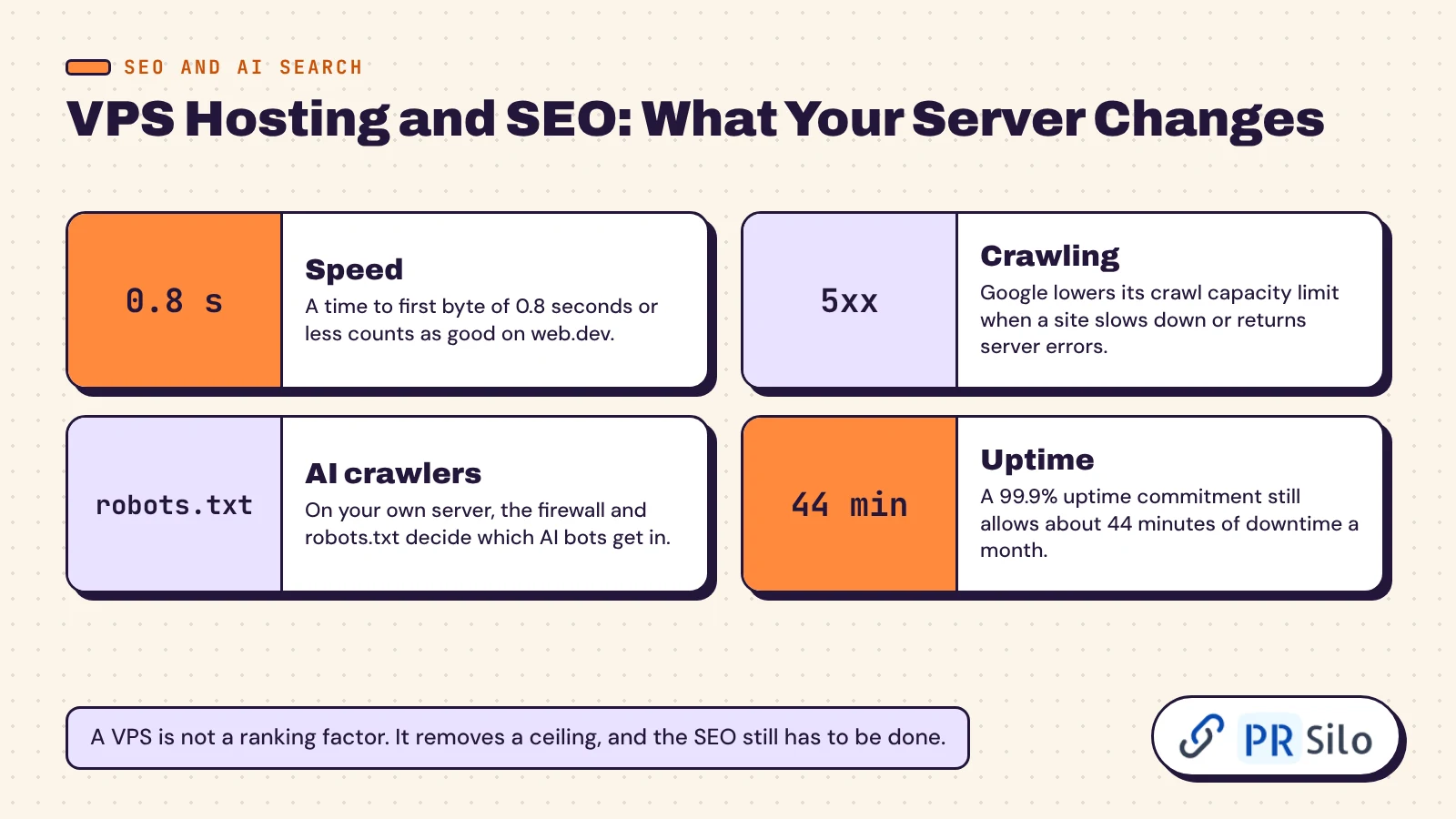
None of this makes a VPS a ranking factor. A well-run shared plan beats a neglected VPS. Good hosting removes a ceiling, and the SEO still has to be done. For a quick read on where your site stands, run through our DIY SEO audit in under an hour. If slow responses or crawl errors show up, that’s the kind of problem our technical SEO services are built to fix.
How to Start a VPS Hosting Company
A surprising number of readers arrive from the other side. They want to sell VPS, not buy it. There are two routes.
The light route is reselling. You rent capacity wholesale from an established provider, put your brand on it, and automate signup and billing with software such as WHMCS. No hardware, low risk, thin margins.
The heavy route is running your own nodes. You rent or colocate dedicated servers, install a virtualization platform to carve them into virtual servers (Proxmox VE is the popular open-source choice, built on KVM and LXC, while Virtualizor and SolusVM are commercial), buy IP addresses and wire it all to billing. Then the real work starts: abuse reports, DDoS attacks, tickets at 3 a.m. And in 2026 the hardware costs far more than it did a year ago.
Either way, selling server hosting is mostly a support job. The machines are the easy part. Start as a reseller, learn what customers ask for, then decide whether owning hardware is worth it. Companies hosting VPS customers at scale spent years getting that support right.
Your First Hour on a New VPS
- Pick the system image. Ubuntu LTS or Debian, unless something forces Windows.
- Log in over SSH, create a normal user, add your SSH key, then switch off password logins and direct root login.
- Update everything and turn on automatic security updates.
- Switch on the firewall. Allow SSH, HTTP and HTTPS, and nothing else until you need it.
- Install your stack: a web server, PHP or Node or Python, and a database. Or install a panel and let it do this for you.
- Point your domain’s A record at the new IP and issue a free TLS certificate.
- Set up backups and uptime monitoring before anything important goes on it.
That’s about an hour for a first-timer following a guide. People sometimes ask what is VPS server hosting like day to day. After that first hour, mostly quiet. You log in for updates, check the graphs now and then, and forget it’s there.
Frequently Asked Questions
What does VPS stand for?
Virtual private server. “Virtual” because software creates it, “private” because its allocation belongs to one customer. You’ll also see VDS (virtual dedicated server), virtual server, now and then virtual private machine, and on Polish sites serwery VPS, which is simply the plural.
Is VPS hosting the same as cloud hosting?
No, though they overlap. A traditional VPS runs on one physical machine. Cloud hosting runs on a cluster and usually bills by usage. A cloud VPS is the hybrid: fixed VPS-style plans on clustered hardware, so one failed node doesn’t keep you offline for long.
Is VPS hosting faster than shared?
Usually, and more to the point it’s steadier. Reserved resources mean your speed doesn’t depend on what the neighbours are doing. Better website performance is the normal result, but a badly tuned VPS can still crawl, so caching and a sensible stack matter as much as the plan.
VPS hosting vs web hosting: what is the difference?
People ask what is VPS hosting vs web hosting as if the two were rivals. They aren’t. Web hosting is the umbrella term for any service that puts a site online. When a company sells a plan called simply “web hosting”, it nearly always means a shared account. VPS is one type of web hosting, with your own isolated machine in place of that shared account.
Can I host multiple websites on one VPS?
Yes. Each site gets its own virtual host on the web server, or its own account in a panel. Agencies do it all the time. The only limits are RAM and CPU, so watch usage as you add sites, and think about splitting the load across 2 VPS instances once a busy site starts crowding the others.
Do I need technical skills to run a VPS?
For an unmanaged one, yes: basic Linux, SSH, updates, a firewall and backups. For a managed VPS you need no more than you would on a shared plan. A VPS server with a control panel sits somewhere in between.
Does a VPS come with root access?
Almost always on unmanaged plans. Some managed plans limit it so you can’t break what the provider is responsible for. Check before you buy if you need to install system-level software.
Can I upgrade my VPS later?
Yes. Most hosts let you move up a tier from the dashboard with a short reboot. Moving down is harder and can mean migrating to a new machine, which is one more reason to start small.
How much does a VPS cost per month?
In November 2026, reputable unmanaged plans start around $4.50 to $9 a month, and a 4 GB machine runs anywhere from about $5 to $24 depending on the provider. Add $10 to $30 for management or a commercial panel, and always check the renewal price.
What is the difference between a VPS and a VPN?
They sound alike and do different jobs. A VPS is a machine you rent to run things on. A VPN is an encrypted tunnel that hides your traffic. You can install VPN software on a VPS, which is where the confusion starts.
So, Is a VPS Right for You?
Back to where we started: what is VPS hosting? A reserved, isolated slice of a server that you control. It sits between shared plans and dedicated hosting in both price and power, and in 2026 it starts at roughly the cost of two coffees a month.
If your site is small and quiet, stay where you are. If it earns money, runs a shop or needs software your host won’t allow, move. Pick KVM, NVMe and at least 2 GB of RAM. Choose managed hosting if nobody on your team wants to patch a machine. Judge every plan by its renewal price.
And if you’ve already upgraded and the traffic still isn’t coming, the machine probably isn’t the problem anymore. That’s our side of the fence. Have a look at our complete SEO solution, or get in touch and tell us what’s stuck.