
Search for the sitemap generator by SpellMistake and you’ll find a dozen articles praising it. Very few tell you where it actually is. Some send you to a blog that has no generator on it. One says the tool doesn’t exist at all. Another claims it makes image, video and news sitemaps, which the tool page itself never mentions.
So we went and looked. On 9 November 2026 we opened both SpellMistake websites, clicked through every dropdown on the generator, and held each setting up against what Google and Bing say they read. What follows is the stuff we wish those other articles had told us: where the thing lives, which boxes to leave alone, how to get from a blank form to a green “Success” in Search Console, and when you’re better off with something else.
What Is the Sitemap Generator by SpellMistake?
Here’s the gist. The sitemap generator by SpellMistake is a free sitemap generator living at spellmistake.com/xml-sitemap-generator, and you use it in an ordinary browser tab. Paste in your domain. Choose how far it should crawl, fiddle with three optional dropdowns if you feel like it, and press the button. It wanders through your internal links and hands you back an XML file, which you then park on your server and point Google and Bing towards.
Here’s what the page looked like on the day we checked:
| Detail | What we saw on 9 November 2026 |
|---|---|
| Address | spellmistake.com/xml-sitemap-generator |
| Price | Nothing. No login wall either |
| What you get | One standard XML sitemap |
| Optional tags | Last modified date, change frequency, priority |
| Crawl sizes | Eleven choices, from 50 pages up to 5,000 |
| Out of the box | Every optional tag off, crawl set to 50 |
| Image, video or news sitemaps | Not on the form |
SpellMistake.com itself is one of those big free toolboxes (we counted more than 50 utilities, from a robots.txt generator to a broken link finder). The sitemap tool is filed under Website Management and also shows up in the site’s “Top 5 Tools” box, so it’s clearly one of their busier pages.
SpellMistake.com vs SpellMistake.info: Which One Has the Tool?
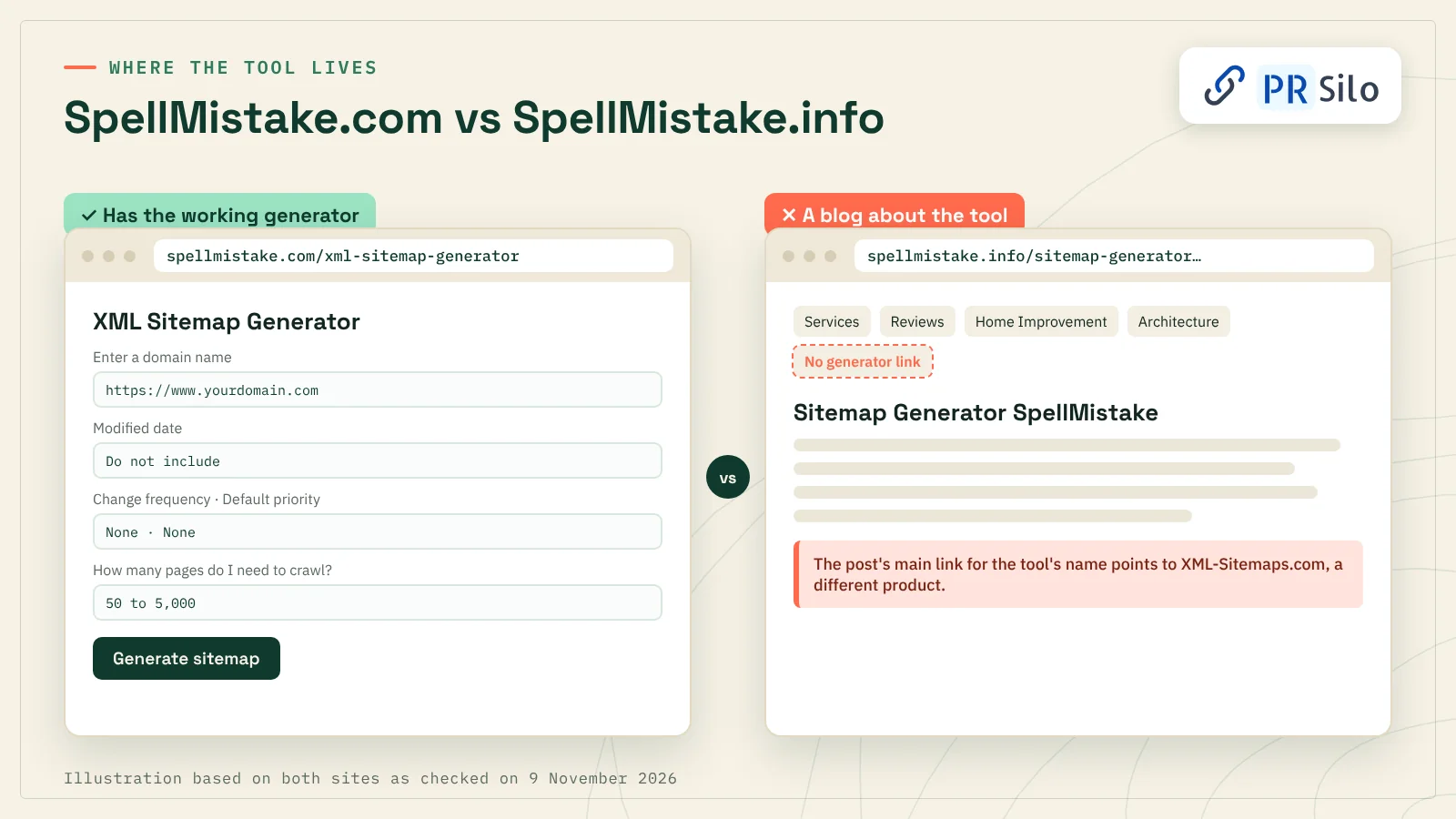
This is where most guides go wrong. Two websites, nearly the same name.
SpellMistake.com is the one with the working generator. Form, dropdowns, Generate button, all of it.
SpellMistake.info is a blog. Every post we saw there is credited to someone called Justin, and one of them is titled “Sitemap Generator SpellMistake.” That post tells you to open the generator from the site’s menu. We looked. The menu has Services, Reviews, Home Improvement, Architecture… no generator. Odder still, the post’s main link for the phrase sitemap generator spellmistake sends you to XML-Sitemaps.com, which is a different product entirely.
A fair number of the articles ranking for this keyword repeat the .info instructions. Hence all the confused people landing on a page with nothing to click. Bookmark the .com address, and give the address bar a glance before pasting your domain into a form, any form.
The File First, Then the Tool
Quick detour to the file itself, since the generator won’t make much sense until you’ve seen what it spits out. A sitemap is basically a guest list: here are the URLs I’d like you to meet, Google. Nine times out of ten it’s XML, it’s named sitemap.xml, and it follows a format laid out on sitemaps.org that Google, Yahoo and Microsoft agreed to back in 2006 (it has hardly budged since). Google also accepts an RSS or Atom feed. Or a bare text sitemap, honestly the laziest option going: a .txt file, one URL per line, done.
So, what is a sitemap generator? It’s the thing that types that list out for you, because nobody wants to hand-write 300 URLs wrapped in angle brackets. Call it an XML sitemap generator when it outputs XML, which is nearly always. The ones that generate sitemap from URL input alone, SpellMistake’s included, are really a small sitemap crawler wearing a friendly form. Off it goes from your homepage, hopping link to link, keeping anything that loads cleanly and scribbling down each address as it passes. A single entry comes out like this:
<url>
  <loc>https://www.example.com/services/</loc>
  <lastmod>2026-11-02</lastmod>
</url>
Now for the cold water. A sitemap is a hint. Google’s own documentation says submitting one is no promise that anything gets crawled or indexed, and it certainly won’t lift rankings on its own. Where it earns its keep is discovery: brand-new sites nobody links to yet, big sites with pages buried six clicks deep, and that one landing page your menu forgot.
Google even admits a tidy site of roughly 500 pages or fewer, well linked and light on video, might get by without one. We’d make one anyway. Five minutes of work buys you a Search Console report and a safety net for pages that drift out of your navigation. If a client ever asks us what is a sitemap generator worth to a tiny site, that’s the honest answer.
Every Setting on the Form, and What We’d Pick
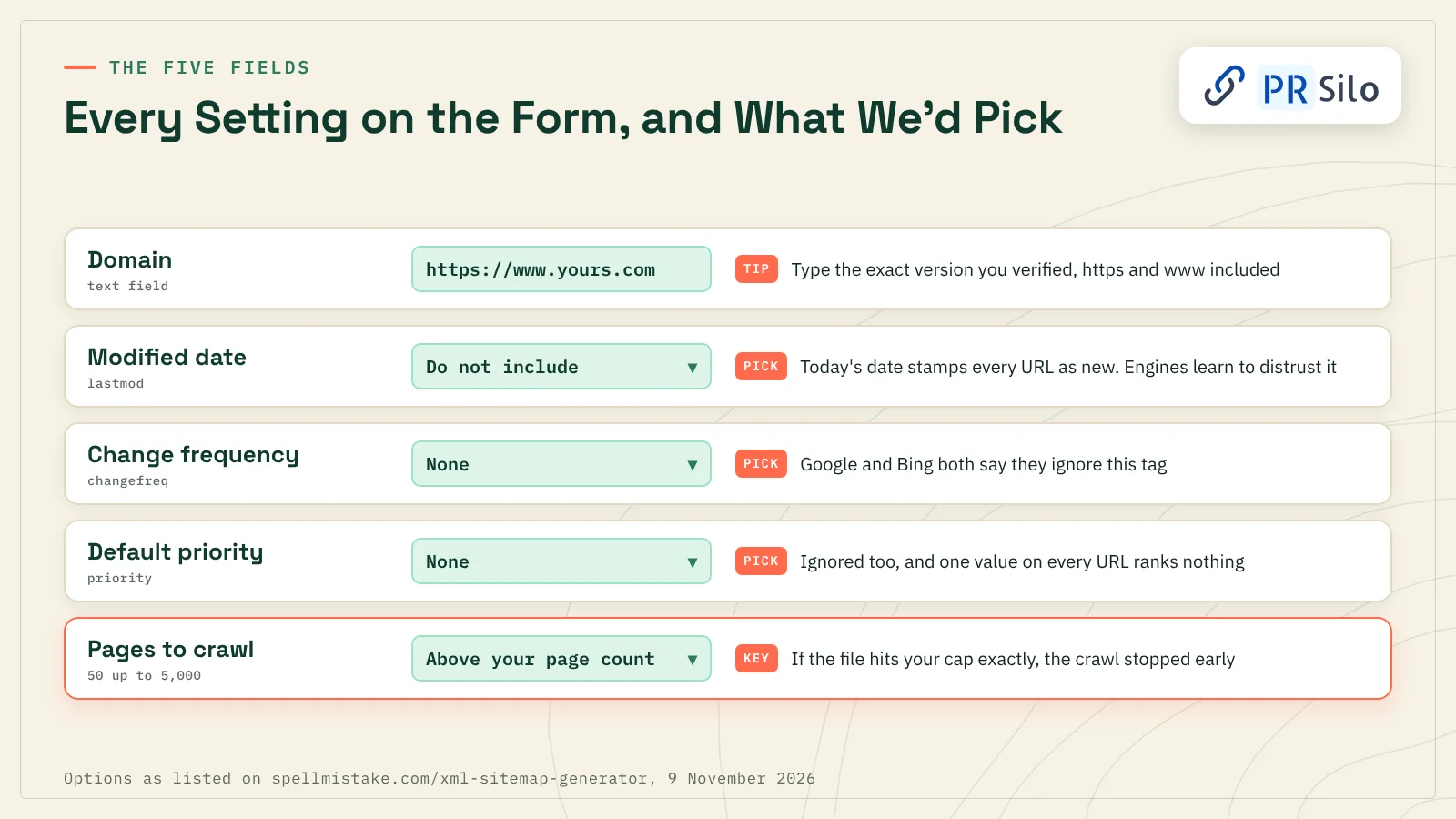
The form for the sitemap generator by SpellMistake has five fields. Three of them you can mostly ignore. Seriously.
Domain. Type the full address, https and all, in exactly the form your site uses. If you live at https://www.example.com and type example.com, the URLs may not match the property you verified, and Search Console will grumble about a “path mismatch.” Easy to avoid.
Modified date. Three choices here: do not include, today’s date, or a custom date. This becomes the lastmod tag, and it’s the only optional tag anyone still reads. Google uses it only when your dates are consistently and verifiably accurate. Bing was blunter in July 2025, asking site owners not to stamp lastmod with the sitemap’s generation time unless the page content really changed. “Today’s date” does exactly that to every URL at once. Our advice? Leave it on “do not include” unless your whole site genuinely changed on the date you’d enter.
Change frequency. You’ll see seven options, from “none” to “yearly” with hourly and friends in between. Whatever you pick lands in the sitemap changefreq tag, and Google and Bing have each said, in writing, that they don’t read it. None it is.
Default priority. None, or 0.0 up to 1.0. Also ignored by both engines. There’s a logic problem too: one default value gets copied onto every URL, so even an engine that cared couldn’t tell your homepage from your cookie policy.
How many pages do I need to crawl? Here’s the setting worth your attention. Pick a number comfortably above your real page count. Got 340 pages? Choose 500, not 250. Oh, and if the finished file holds precisely as many URLs as the cap you chose, that’s no coincidence. The crawler hit the ceiling. Run it again, bigger.
| Setting | Options | Our pick | Reason |
|---|---|---|---|
| Modified date | Do not include, today’s date, custom date | Do not include | A fake “updated today” date teaches engines to distrust you |
| Change frequency | None through yearly | None | Google and Bing skip it |
| Default priority | None, 0.0 to 1.0 | None | Skipped, and it’s the same number everywhere anyway |
| Pages to crawl | 50 up to 5,000 | Higher than your page count | Hit the cap and pages go missing |
A quick word on one review we read. StartupBooted reported files containing only the URL tag and a crawl that stalled somewhere near 500 pages. That lines up with what you’d get from the defaults, since every optional tag starts switched off. The live form now lists sizes up to 5,000. We didn’t run a crawl for this piece, so take our notes as a description of the form, not a benchmark, and check your result against a page count you trust.
How to Use SpellMistake’s Sitemap Generator, Step by Step
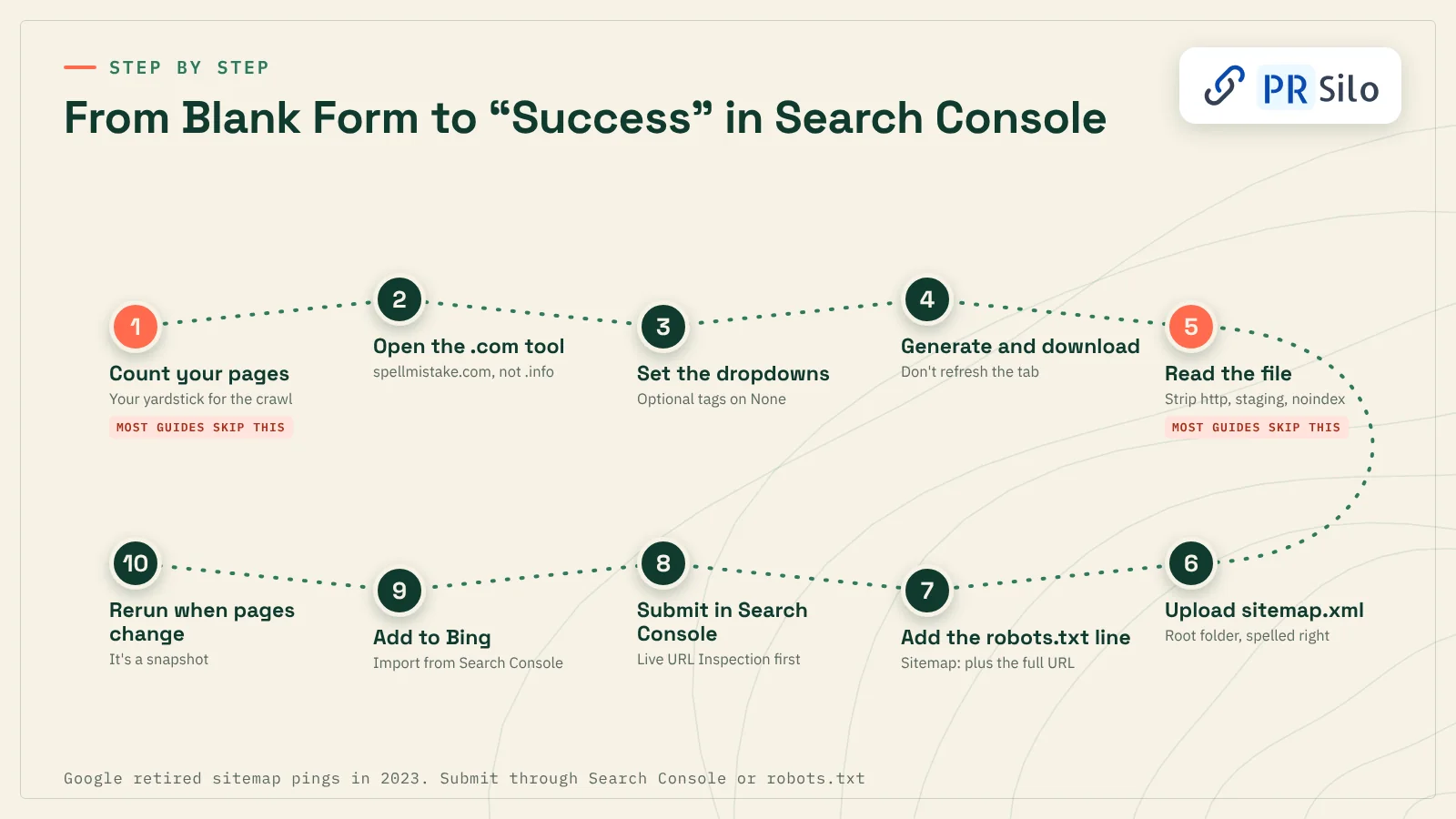
If this is your first go at how to create a sitemap, do it in this order. Steps 1 and 5 are the ones every other guide seems to skip.
- Count your pages before you start. Your CMS shows the number somewhere (WordPress puts it right at the top of the Posts and Pages screens). Jot it down. You’ll want it later to sanity-check the crawl. Not sure you even need a new file? Skip ahead to the bit on how to get a sitemap of a website and check first.
- Go to the real tool. That’s spellmistake.com/xml-sitemap-generator. Type your domain the way your site actually serves it.
- Set the dropdowns. Use the table above. For most sites: everything optional on none, crawl size above your page count.
- Generate, wait, download. Small sites finish quickly. Bigger ones take a while, so don’t refresh the tab.
- Open the file and read it. Yes, really. Does the URL count roughly match your number from step 1? Good. Now scroll for the junk that turns up in crawled sitemaps again and again: old http links on an https site, a mix of www and non-www, URLs dragging ?utm tracking tails, a forgotten staging page or two, pages you’d set to noindex. Strip them out in any plain text editor (Notepad’s fine; Word is not). Loads of folks who create XML sitemap files with a crawler skip this bit entirely. Then a half-finished test page shows up in Google and nobody can work out why.
- Call it sitemap.xml and put it in the root folder. cPanel’s file manager works; so does plain old FTP. Get the location right and https://yourdomain.com/sitemap.xml shows you a wall of XML in the browser. And check the spelling twice. A file saved as sitmap.xml can sit there for months, quietly 404ing, and nothing will warn you.
- Point robots.txt at it. One line does it: the word Sitemap, a colon, a space, then the file’s full URL. Any crawler that bothers to read robots.txt (most of the polite ones) will spot it.
- Submit in Google Search Console. Before submitting, we like to paste the sitemap address into URL Inspection and run the live test, which tells you straight away whether Googlebot can actually reach the thing. If it can, open Sitemaps in the left-hand menu, paste the address under “Add a new sitemap” and press Submit.
- Bing Webmaster Tools too, please. People skip Bing all the time, which is a shame now that its index feeds Copilot. If your site’s verified in Search Console already, Bing’s import button copies the site and its sitemaps over in a couple of minutes. No Search Console? Then it’s a manual paste into Bing’s Sitemaps page, which takes about as long as reading this sentence.
- Remember it’s a snapshot. The day you publish something new, that file is out of date. Rerun the crawl and swap it.
One more thing. Some tools and older plugins still offer to “ping Google” with your sitemap. Ignore the button. Google called time on sitemap pings in June 2023; try the old address today and you’ll get a 404, as you have since early 2024. What’s left is Search Console, the Search Console API and that one robots.txt line. If you need to submit sitemap XML files to Google, those are your three doors.
Reading Your Results in Google Search Console
Then you wait. Sometimes it’s minutes, sometimes a couple of days, before the Sitemaps report shows a status, and it’ll be one of these three:
- Success: the happy one. Fetched, processed, nothing to fix.
- Has errors: Google read it but tripped over something. Anything it could parse still gets queued, so you haven’t lost everything.
- Couldn’t fetch: Google never got the file at all.
When something does break, it’s nearly always one of these five:
“Couldn’t fetch” or a 404. Usually a typo in the file name, the file sitting in the wrong folder, or a password on the site. Open the sitemap link in an incognito window; if you can’t see it, Googlebot can’t either.
Blocked by robots.txt. Some Disallow line is catching the file, or the pages listed in it. Loosen it.
Path mismatch. You verified the www version and the file is full of non-www links, or the same mix-up with http and https. Regenerate using the exact address from your property.
Invalid date. Google couldn’t parse a lastmod value. Write dates like 2026-11-09, or leave lastmod out.
URL not allowed. The file lists addresses from another domain, or from outside its own folder. Keep to your own pages and keep the file at the root.
One thing trips people up constantly: submitted isn’t the same as indexed. The Sitemaps report counts URLs Google discovered. The Page indexing report is where you see which ones made it in and why the rest didn’t. Deleting a sitemap from that report, by the way, won’t make Google forget a single URL. If you actually want Google to back off certain pages, you’ve got three levers: a robots.txt block, a noindex response, or deleting them.
Limits Every Free Sitemap Crawler Shares
None of this is a dig at SpellMistake specifically. Any website sitemap generator that builds its file by crawling bumps into the same walls.
- Orphan pages don’t show up. No links in, no visit. Annoyingly, those are the very pages a sitemap exists to rescue.
- Script-built links can be invisible. Lots of modern themes build their menus and product grids with JavaScript after the page loads, and a basic HTML crawler can walk straight past them.
- It can’t read your mind. If it doesn’t read canonical tags or noindex, you’ll get both copies of any duplicate in the list, plus the pages you were trying to keep quiet.
- Broken links turn up, but stay broken. A 404 or a redirect chain might pop up in the output. Do a proper pass for broken links before trusting the file. Our DIY SEO audit in under an hour shows a quick way.
- It goes stale. Nothing refreshes the file for you.
What won’t bite you is file size. Google’s ceiling per sitemap is 50,000 URLs or 50 MB uncompressed, and a 5,000-page crawl is nowhere near it.
When Your CMS Already Builds the Sitemap
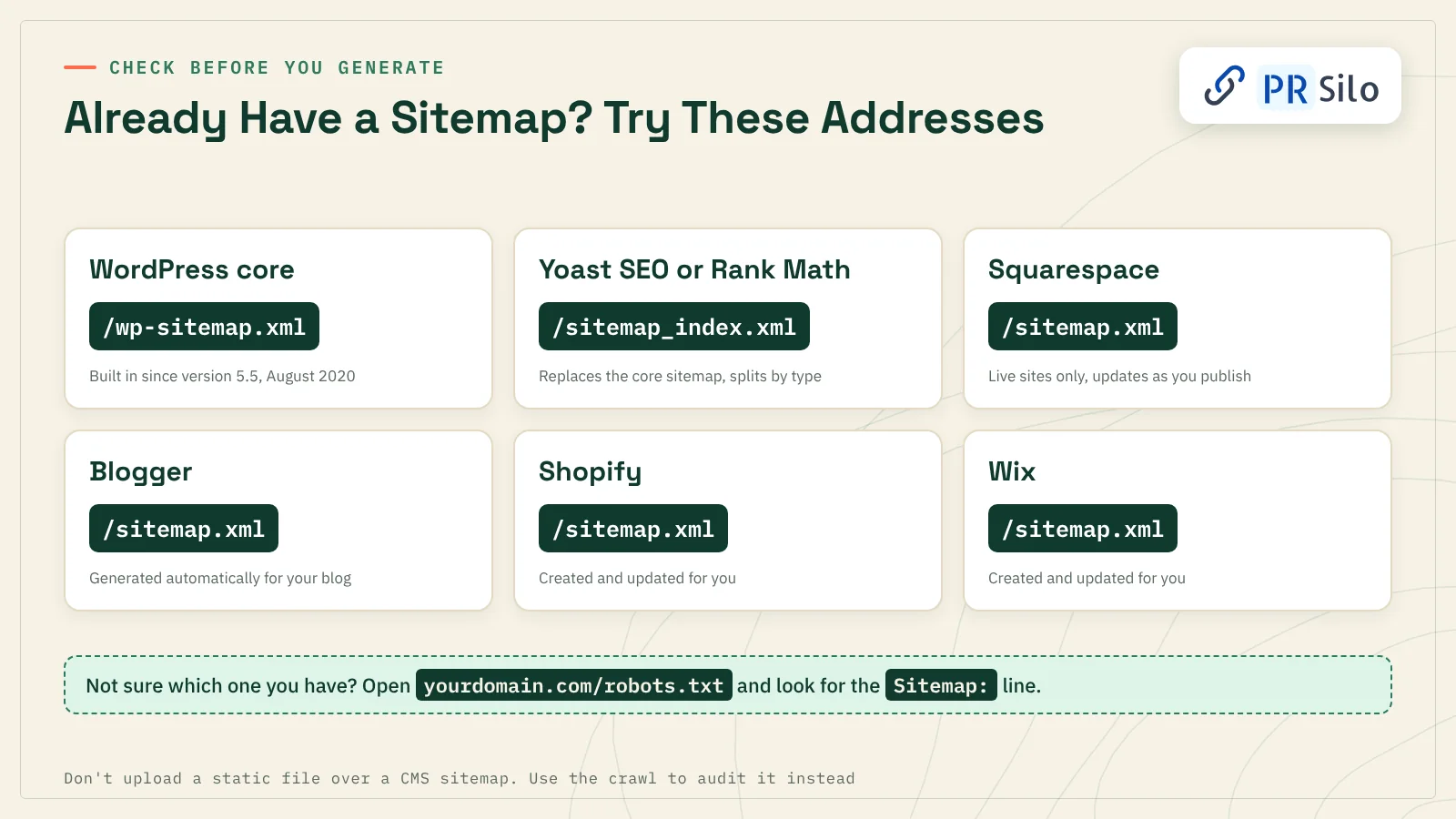
Here’s a question worth asking before you generate anything: do you already have one? Odds are your site builder made one the day you launched, in which case the question of how to create a sitemap is already answered.
- WordPress. WordPress started making its own sitemap in version 5.5, back in August 2020, and parks it at /wp-sitemap.xml (a core WordPress sitemap, no plugin needed). Yoast SEO and Rank Math both switch that off and serve /sitemap_index.xml instead. We run Yoast here, and if you open our sitemap index you’ll find it split five ways: posts, pages, categories, tags and authors.
- Squarespace. If you came hunting for a sitemap generator Squarespace sites can use, good news, you already own one. Live sites get an automatic /sitemap.xml that updates as you publish (trial and password-protected sites miss out). Most searches for a sitemap generator Squarespace owners can use end right there.
- Blogger. Your Blogspot sitemap builds itself too. Try /sitemap.xml on your blog address, then submit the Blogspot sitemap in Search Console like any other.
- Shopify and Wix. Both look after sitemap.xml for you, updates and all.
On any of these, please don’t upload a static file over the built-in one. It’ll be stale the next time you hit Publish, and two rival sitemaps turn your reports into a guessing game. Use the sitemap generator by SpellMistake as an audit instead. Crawl the site, line the crawled list up against your CMS sitemap, and look at what doesn’t match. Pages in the CMS file the crawl never reached? Orphans. Pages the crawl found that the CMS skipped? Worth a closer look.
And if you’re wondering how to get a sitemap of a website you don’t run, a competitor’s say, open its robots.txt and look for a Sitemap: line. Nothing there? Try the usual suspects after the domain: /sitemap.xml, then /sitemap_index.xml, then /wp-sitemap.xml. One of them usually turns something up.
SpellMistake vs Other XML Sitemap Generators
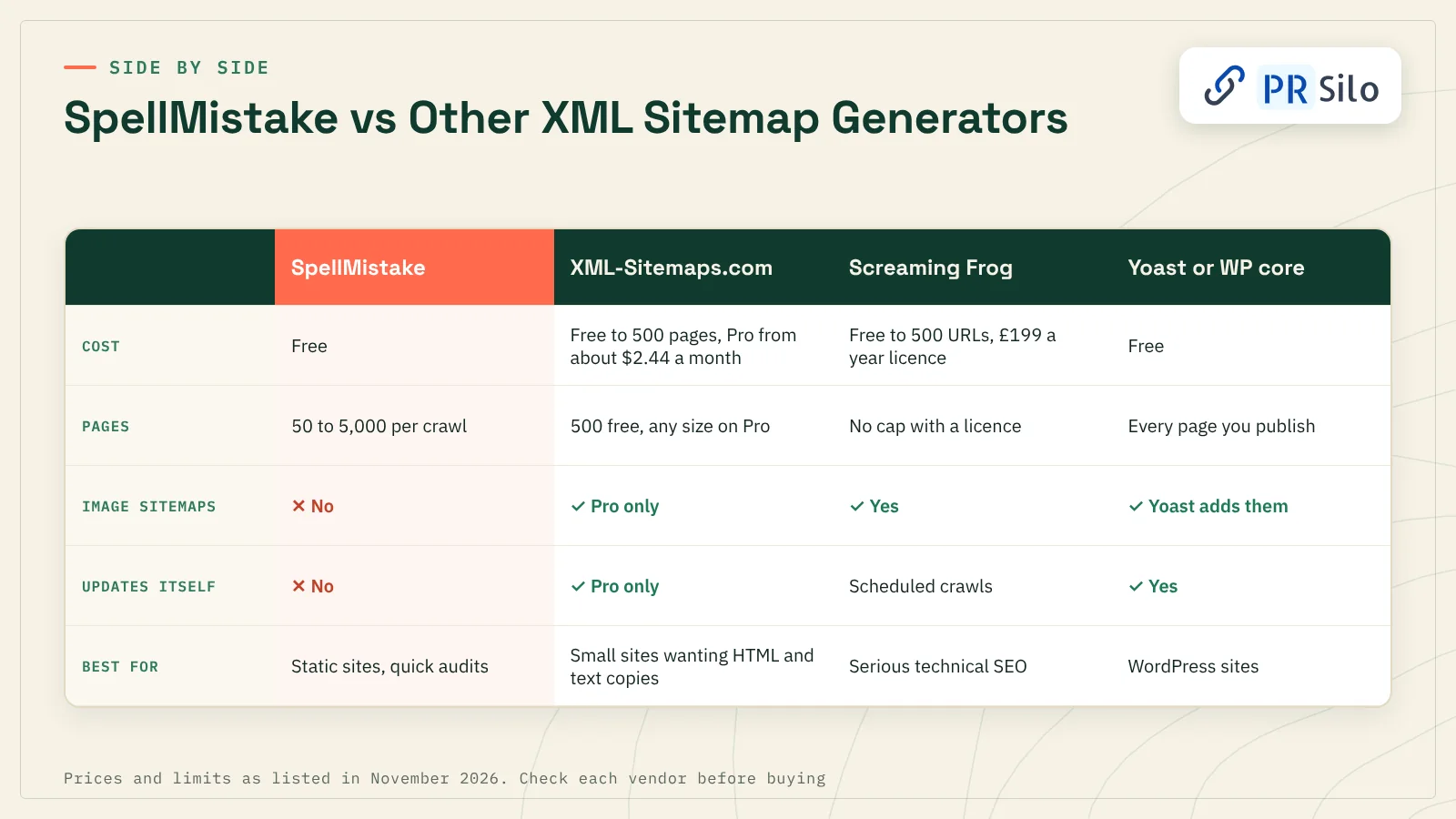
How does it stack up against the XML sitemap generator tools people usually bring up? Here’s where things stood in November 2026.
| Tool | Cost | Pages | Optional tags | Image or video | Updates itself | Good for |
|---|---|---|---|---|---|---|
| SpellMistake | Free | 50 to 5,000 per crawl | Lastmod, changefreq, priority, all optional | No | No | Static sites, quick audits |
| XML-Sitemaps.com | Free to 500 pages, Pro from about $2.44 a month | 500 free, any size on Pro | Some metadata | Pro only | Pro only | Small sites that also want HTML and text copies |
| Screaming Frog SEO Spider | Free up to 500 URLs, then a £199 yearly licence (roughly $279) | No cap once licensed | You control all of it | Images, yes | Via scheduled crawls | Serious technical SEO |
| Yoast SEO or WordPress core | Free | Every page you publish | Real dates pulled from your edits | Yoast throws in images | Yes | WordPress sites, obviously |
The sitemap generator by SpellMistake earns its spot as a free sitemap generator online: no install, no account, no fuss. Need to generate sitemap from URL input and be done in five minutes? Nothing in that table is faster, and for a hand-coded or static site we’d reach for it first. XML-Sitemaps.com has been around forever, and its free tier quietly hands you HTML and text versions alongside the XML. Once you’re into thousands of pages, JavaScript navigation or several languages, though, a desktop crawler wins without much of a fight.
Using Screaming Frog Instead
The Screaming Frog SEO Spider builds its sitemap off a full technical crawl, and that’s the whole difference. You crawl the site, open the Sitemaps menu and pick XML Sitemap. By default it only keeps pages answering with a 200 status. Redirects, errors, noindex pages, canonicalised pages and anything robots.txt blocks get dropped, which is precisely the cleanup a quick web generator never attempts. On top of that you can pull lastmod from your server’s Last-Modified header, bolt on images, carry existing hreflang across and split the output by segment. Their own XML sitemap tutorial walks through it screen by screen.
Image, Video, HTML, Text and Visual Sitemaps
People say “sitemap” and mean at least five different things, which causes no end of crossed wires.
Image sitemaps. These tuck image:image and image:loc entries under each page URL, up to 1,000 images per page. Google quietly removed the caption, title, geo location and license tags from its docs a while back, so a modern image sitemap generator really only has to say where each image lives. CDN-hosted images count, provided you’ve verified that host in Search Console. SpellMistake doesn’t make these. Screaming Frog, Yoast and XML-Sitemaps Pro do.
Video sitemaps. With a video sitemap you’re describing each video to Google in some detail (title, description, thumbnail, the file or player location, running time if you like). For one embedded explainer it’s honestly not worth the effort. For a proper video library, it is.
News sitemaps. Publishers in Google News only. Each entry carries the article’s title and publication date.
HTML sitemaps. A plain page for humans, more or less a tidy list of links to your main sections. An HTML sitemap generator can save a large site some typing, but the page doesn’t stand in for the XML file.
Text sitemaps. About as basic as it gets. If all you’ve got is a spreadsheet column of URLs, paste it into Notepad, save it as .txt, and congratulations, that’s a text sitemap Google will accept.
Visual sitemaps. Boxes-and-lines diagrams of a site’s structure, usually drawn before a single page exists. A visual sitemap generator like Slickplan or Octopus.do gets designers and clients agreeing on navigation. Some can import an existing sitemap.xml and draw what you’ve already got, which makes a visual sitemap generator handy right before a redesign. Search engines never see any of it, mind you.
Sitemaps and AI Search: Why Honest Dates Matter More Now
AI answers lean on the same crawling and indexing as plain blue links. A page that was never discovered can’t be quoted.
Bing put this in writing in a July 2025 post about staying discoverable in AI-powered search. A few lines stood out to us. Lastmod, it says, is one of the main things Bing weighs when deciding what to recrawl, and it usually re-reads a submitted sitemap at least daily. The sitemap changefreq and priority tags? Ignored. And it wants you pairing a complete sitemap with IndexNow, a protocol that pings Bing and other participating engines the moment a URL changes. To its credit, the same post admits no tool can guarantee when, or whether, content turns up in an AI answer.
Which brings us back to that “today’s date” option. Claim every page changed this morning and, sooner or later, search engines stop believing your dates at all. The recipe that holds up across Google, Bing and Copilot is dull, frankly: a complete sitemap, honest lastmod values from your CMS, the robots.txt line, and IndexNow for quick updates.
Being crawlable gets you in the door. Being the source an AI Overview or chatbot actually quotes is another matter, and that leans on authority: editorial mentions, links from sites people already trust. That’s the side of things our digital PR services handle.
Common Spelling Slips Around Sitemaps
A surprising number of searches for this tool start life as typos. Here’s the correct spelling for the words people fumble most:
| What people type | What they meant |
|---|---|
| sitemap genrator, sitemap genarator, sitemap generater | sitemap generator |
| sitemao.xml, sitmap.xml, sitemap.cml, sitempa xml | sitemap.xml |
| screaming frig, screeming frog, scraming frog | Screaming Frog |
| site map generator | sitemap generator (either works) |
Search engines shrug off a typo in the search box. Your server is far less forgiving about one in a file name. Upload sitmap.xml, or fat-finger the loc tag inside the file, and the whole sitemap fails quietly. So get the correct spelling right where it counts, in the file itself.
Sitemap Mistakes to Avoid
Whatever automatic sitemap generator you end up using, run the finished file past this list before it goes live:
- URLs that redirect, return a 404 or point somewhere else via a canonical tag
- Pages set to noindex, or blocked in robots.txt
- http mixed with https, or www mixed with non-www
- Staging, test, login or thank-you pages
- Duplicates spawned by tracking parameters or session IDs
- Lastmod dates that don’t match real content changes
- Relative URLs where full addresses belong
- A file that isn’t saved as UTF-8
- A sitemap nobody has touched since launch day
Running a ten-page brochure site? You could honestly create XML sitemap files by hand in a text editor, copying the sample entry above. Anything bigger than a few dozen pages, let software do the typing and then check its homework against this list.
Your Questions, Answered
Q1. Is the SpellMistake sitemap generator free?
Yes. When we checked on 9 November 2026, the sitemap generator by SpellMistake loaded and offered crawls of up to 5,000 pages without asking for an account or a card, so it really is a free sitemap generator online with no sign-up. The site does push paid guest posting services elsewhere, but the generator costs nothing.
Q2. Is the SpellMistake tool real, or is the name just a typo?
It’s real. Plenty of people typing sitemap generator spellmistake assume it’s a misspelling, but SpellMistake is a brand, and its working generator sits on spellmistake.com. One competing article claims the phrase is just a misspelling of “spelling mistake,” which isn’t right. Most of the muddle comes from SpellMistake.info, a separate blog that writes about the tools without hosting the generator.
Q3. Can it handle large or e-commerce websites?
Only so far. Five thousand pages is the top setting, and big stores tend to tuck products behind filters, scripts and endless pagination, which link-following crawlers are bad at reaching. You’re better off with the sitemap your platform already makes: Shopify has one, and a WooCommerce shop gets a WordPress sitemap from core or from Yoast or Rank Math.
Q4. Will it keep my sitemap updated?
Nope. You get one file, frozen at the moment of the crawl. Publish or delete pages and it’s back to the form for another run, then a fresh upload. Anyone who’d rather never think about this again should use the CMS’s own sitemap or an automatic sitemap generator plugin.
Q5. Does it make image, video or HTML sitemaps?
Not from what we saw. You get plain XML and that’s it. Images are better handled by an image sitemap generator like Screaming Frog, XML-Sitemaps Pro or Yoast. As for a video sitemap, you’ll want something that can read your video details: Yoast’s video add-on, or a developer. An HTML sitemap is really just a page you build, by hand or with an HTML sitemap generator.
Q6. Will a sitemap help my Google rankings?
Not by itself. Think of it as getting your pages noticed and revisited; whether they then rank is down to the content, the links pointing at them and the site’s technical health. Still, nothing ranks before it’s found.
Q7. How often should I rerun it?
Any time pages come or go, or a URL changes. A static site that barely moves might go months between runs, while a blog posting weekly really belongs on a CMS sitemap that updates itself. Resubmitting in Search Console after every tweak isn’t necessary; Google goes back to sitemaps it already knows about on its own.
Q8. Do small websites need a sitemap?
Google says a well-linked site of about 500 pages or fewer may not. We’d still build one. It takes minutes, you get indexing data in Search Console, and it covers pages that slip out of your menus.
Q9. Where should I submit my sitemap?
Two dashboards matter here: Google Search Console and Bing Webmaster Tools. That’s where you submit sitemap XML files and watch what happens to them. Throw a Sitemap: line into robots.txt for every other crawler, and if Search Console is already set up, let Bing import from it rather than verifying all over again.
Q 10. Is it safe to use?
About as safe as letting any visitor browse your site, because that’s all it does: it reads public pages. No login, no download, nothing installed. Do read the output before uploading, though, same as with any website sitemap generator, since it lists whatever the crawl stumbled across.
Final Word
For a small, static site or a quick crawl audit, the sitemap generator by SpellMistake is a perfectly sensible free sitemap generator. So: .com address, optional tags off, crawl size higher than your page count, and a proper read of the file before it touches your server. Got a CMS sitemap already? Keep it, and use SpellMistake’s crawl as a quick orphan-page hunt. And if pages keep falling out of the index whatever you try, that’s usually a deeper technical problem, the kind our technical SEO services team is set up to untangle.